
Tax season has a way of finding every freelancer’s weak spot. For Fiverr sellers, that weak spot is usually invoices. You didn’t write any. You didn’t send any. So when your accountant asks for them, or when you sit down in March to figure out what you actually earned, you’re stuck digging through an app you mostly use to chat with clients and deliver files.
Here’s the good news: Fiverr has already made the invoices for you. Every order, every tip, every Seller Plus charge has a record sitting in your account right now. You just need to know where to find it, what it tells you, and what it doesn’t.
Where your Fiverr invoices actually live
Log in to Fiverr on a desktop browser (the mobile app won’t show you this). Go to your profile picture, then select Billing and Payments, and then click on Billing History. That’s where every invoice, credit invoice, and receipt tied to your account sits.

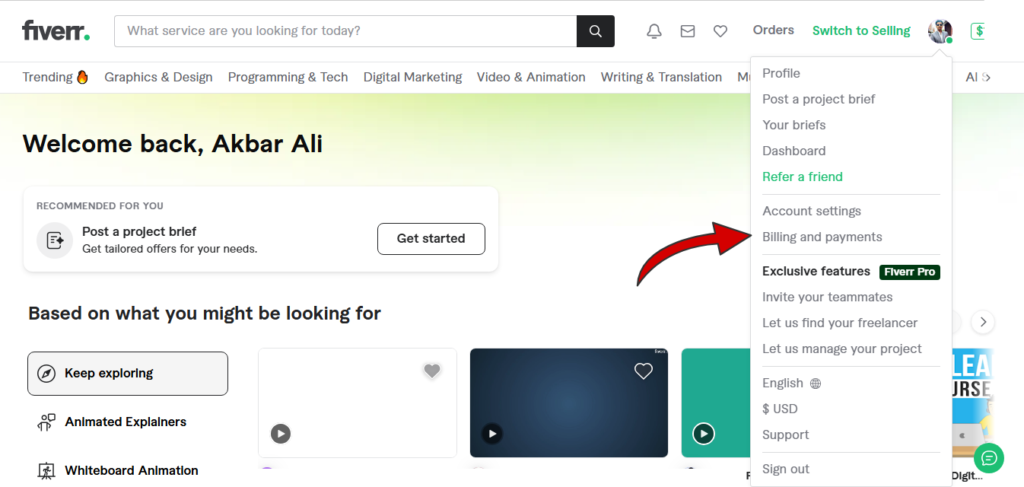
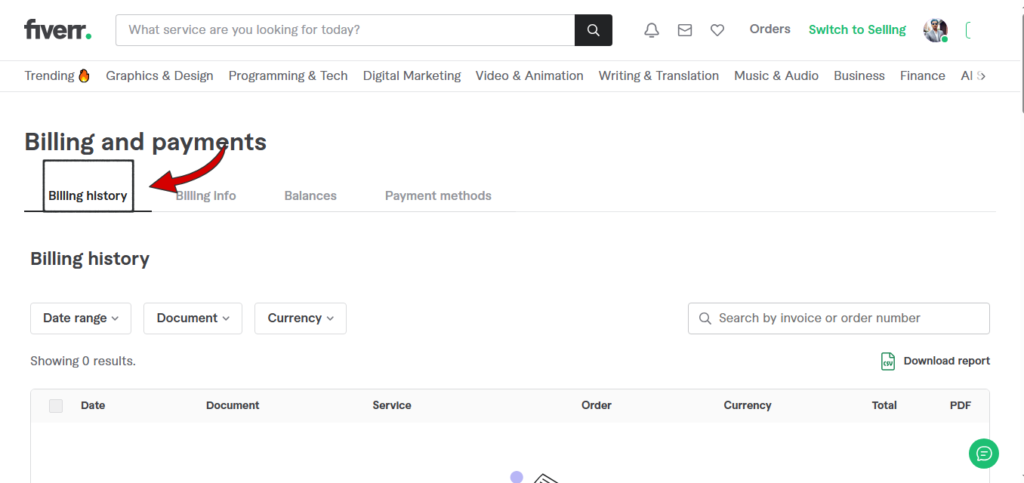
A few things catch people off guard here. First, invoices only go back to mid-2021. If you need anything older, you’ll have to contact Fiverr support directly and ask.
Second, you’ll get a separate invoice for every payment event on an order. If a buyer paid for the gig, then added an extra, then left a tip, that’s three invoices, not one. It looks messy at first glance, but it’s actually more precise than most freelancers’ bookkeeping habits.
If you’re on a Seller Plus or Advanced plan, you also get the option to request a custom invoice report covering a date range instead of clicking through individual orders one by one. Worth doing once a quarter so you’re not facing 200 line items in December.
What’s on the invoice, and what’s missing
A standard Fiverr invoice includes the order number, the date, the service description, the unit price, and the payment method used. That’s useful, but it’s not the whole financial picture for tax purposes.
What it won’t tell you, at least not directly, is your net take-home after fees. The invoice shows the gross order amount. Fiverr’s cut comes out before the money ever lands in your balance. So if you’re tracking income for your tax return based only on invoice totals, you’ll overstate your revenue and understate your expenses, which throws off both numbers in opposite directions.
This matters more than it sounds like it should. A freelancer reporting $40,000 in gross Fiverr orders, without separately tracking the roughly 20% the platform takes, ends up either overpaying tax on income they never touched or scrambling at filing time to reconstruct fee deductions from memory. Neither is a good place to be in April.
Revenue, Balance, and Invoice are not the same thing
Fiverr uses three terms that look interchangeable and aren’t.
Revenue is what you’ve earned from completed orders, before withdrawal. Balance is the running total sitting in your account, which can include revenue plus any refunded buyer payments. An invoice is the individual document generated for a single payment event.
Mixing these up is one of the most common bookkeeping errors I see freelancers make on any gig platform, not just Fiverr. If your books track “balance” as if it equals taxable income, you’re going to misreport. Balance includes money that isn’t yours to keep yet (cleared but unspent) and can include things that aren’t income at all. Stick to invoices and the revenue ledger when you’re building your actual tax records.
The 14-day clearance window, and why it matters
Here’s a detail that trips up cash-basis filers specifically. When a buyer marks an order complete, your payment doesn’t land in your withdrawable balance immediately. It sits in a pending state for 14 days (7 days if you’re Top Rated, Seller Plus Premium, or Pro).
Why does this matter for taxes? If you’re on cash-basis accounting, income generally counts when you receive it, not when the order was placed. An order completed on December 28th might not clear until January. Depending on your jurisdiction’s rules and your accounting method, that could push the income into next year’s return instead of this one.
Talk to an accountant about how your specific tax authority treats this, because the rule isn’t identical everywhere. But the point stands: don’t assume “order completed in December” means “income in December.”
Service fees as a deductible expense
Fiverr charges a flat service fee on every transaction, on top of separate buyer-side fees you never see. For most sellers, that’s a real cost of doing business, and real costs of doing business are usually deductible.
The mistake here isn’t forgetting that fees exist. Everyone knows Fiverr takes a cut. The mistake is not tracking the exact amount separately so you can claim it. If your bookkeeping only records the net amount that hit your bank account after withdrawal, you’ve already folded the fee into your income figure without documenting it as an expense. That’s the difference between paying tax on $100 you never had access to, versus correctly reporting $80 in income and $20 in fees. Same math, very different paper trail if you’re ever asked to show it.
This is exactly what the downloaded invoices and billing history are for. They show the gross amount and the fee separately. Pull that data quarterly, not just once a year.
There’s a second fee layer most Fiverr sellers never track, and it doesn’t show up on Fiverr’s invoice at all: whatever you’re charged by the method you use to actually get the money. If you withdraw through Payoneer, currency conversion alone can run from 0.5% to 3.5%, depending on the type of operation and currency pair, and a cross-currency withdrawal to a local bank account can add up to 2% above the mid-market exchange rate on top of that.
Payoneer also charges a $29.95 annual account maintenance fee if you receive less than $2,000 in 12 months, separate from any transaction costs. None of that appears on a Fiverr invoice. If your books only account for Fiverr’s service fee and ignore what Payoneer (or PayPal, or your bank’s transfer charge) takes on the way out, you’re underreporting your real cost of doing business and overstating your margin.
Build a five-minute habit instead of a year-end scramble
You don’t need new software for this. You need a recurring fifteen minutes on your calendar, once a month, where you download that month’s invoices and drop the numbers into a simple spreadsheet: gross order amount, fee taken, net received, date cleared.
If you’re running this across more than one platform, or you take on direct clients outside Fiverr who you do need to invoice yourself, that’s where a separate invoicing setup becomes worth having on hand, something free and built for freelancers managing their own client billing, like Invoice Generator Pro Provpidipng Free Fiverr Invoice Generator, rather than trying to force Fiverr’s automated system to do a job it was never built for.
The freelancers who dread tax season the most are almost always the ones who treat bookkeeping as a once-a-year event. The ones who don’t dread it have usually built a boring, repetitive habit that takes less time each month than this article took to read.
Three mistakes that come back to bite you
Reporting balance instead of revenue. Covered above, but it’s worth repeating because it’s the single most common error.
Losing track of currency conversion fees. If you’re paid in a currency other than your local one, Fiverr’s conversion fee is a separate line item from the service fee. Both are real costs. Both belong in your records.
Assuming Fiverr will hold your records forever. Invoices are only guaranteed back to mid-2021, and account deletion wipes your access entirely. If you’re closing an account or switching how you work, download everything first. Nobody reissues this stuff after the fact.
A short year-end checklist
- Pull a full-year billing history report (or request the custom report if you’re on Seller Plus or Advanced).
- Reconcile gross orders against fees against net deposits. The three numbers should tie together.
- Separate any order completed in late December where the clearance period pushed payment into January.
- Note currency conversion fees as a distinct expense line, not folded into the general service fee.
- Back up your invoices outside Fiverr. A downloaded folder or spreadsheet, not just reliance on the platform’s archive.
None of this is complicated. It’s just tedious in exactly the way bookkeeping always is, and tedious work done monthly beats urgent work done in April.
What happens if you don’t keep your invoices and records
This is a problem freelancers run into everywhere, not just at tax time. Payoneer, PayPal, and your own bank all run fraud checks constantly, and when a large or unusual payment lands in your account, any of them can place a hold on it while they ask you to prove where the money came from.
If you don’t have your invoices and order records ready, you have nothing to send back, and that hold can stretch on for weeks. Some accounts get frozen entirely until the documentation comes through.
Banks do the same thing for the same reason: a payment from a foreign client can look unusual against your normal account activity, so the bank wants proof it’s legitimate freelance income before releasing it. A downloaded Fiverr invoice, paired with your own order records, is exactly the kind of proof that ends a hold quickly instead of dragging it out for weeks.
Freelancers who keep these records on their own computer, separate from the platform itself, tend to get funds released faster and avoid the stress of watching a payment sit untouched while support tickets go back and forth. This happens to sellers in every country, regardless of how long they’ve been freelancing, and it’s one more reason your invoice habit isn’t just a tax-season chore.
Fiverr already built the paper trail for you. The job left for you is reading it correctly and writing down what it actually says.

Akbar Ali is the Founder of InvoiceGeneratorPro.io, a platform dedicated to helping freelancers, small businesses, startups, agencies, and entrepreneurs create professional invoices quickly and efficiently. With years of experience in digital business, SEO content strategy, and online entrepreneurship, he focuses on developing practical tools and educational resources that simplify invoicing, payment management, and financial documentation.As a business writer and digital entrepreneur, Akbar creates in-depth guides, industry insights, and actionable content covering invoicing, freelancing, accounting basics, business finance, taxation, productivity, and payment solutions. His goal is to make complex financial processes easy to understand while helping professionals save time and present their businesses more professionally.Through InvoiceGeneratorPro.io, he continues to build reliable, user-friendly solutions that empower businesses worldwide to streamline their billing workflows and improve financial organization.
Akbar Ali