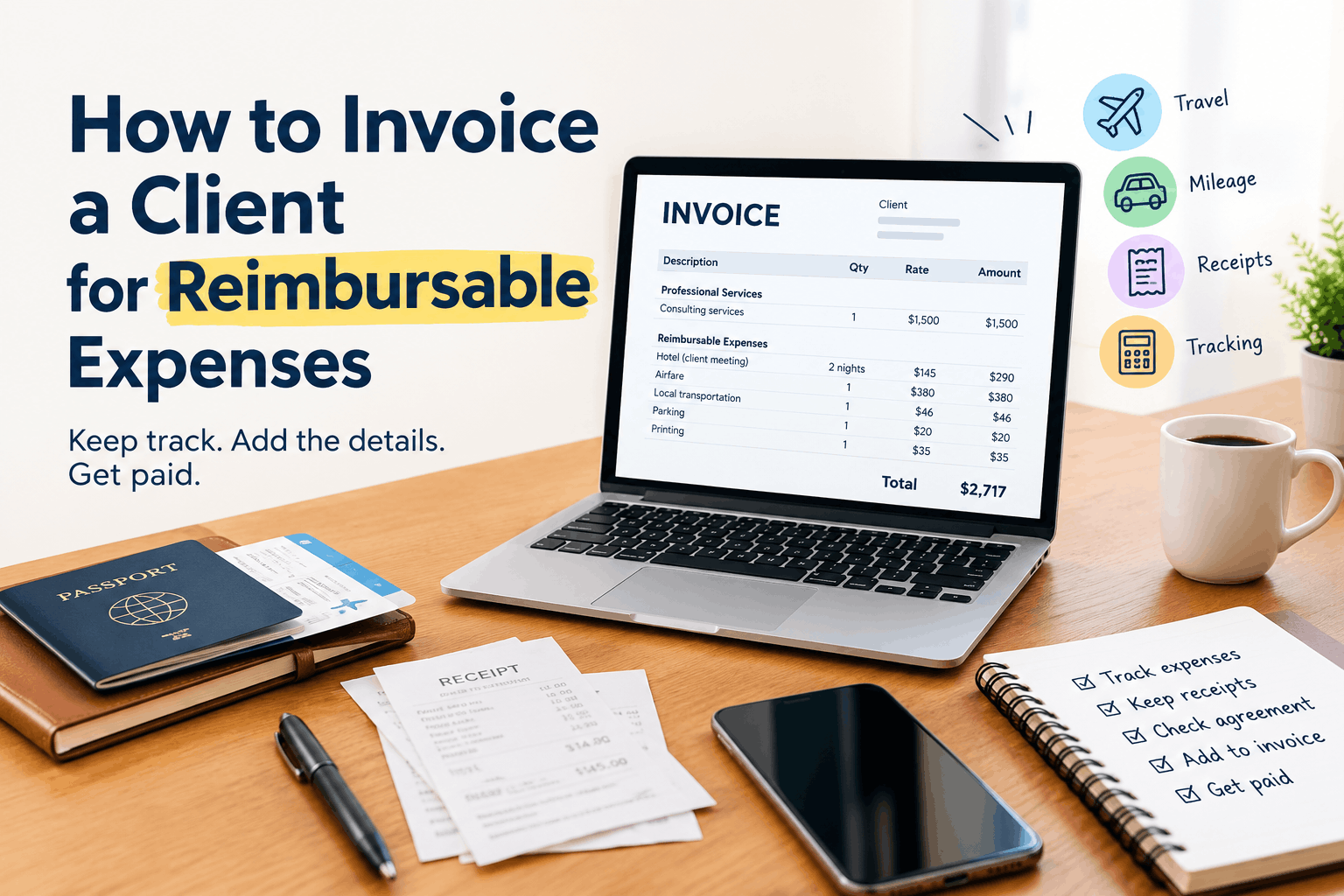
You paid for a hotel because you had to visit a client’s office. You bought materials for a project. Maybe you covered a software fee, parking, shipping, or mileage from your own pocket.
Now the project is finished, and you need to get that money back.
How do you invoice a client for reimbursable expenses without confusing the client or making your invoice look messy?
The process is fairly simple. Track each expense, keep the supporting receipts, check your client agreement, list the expenses clearly on the invoice, and send the documentation your client needs to approve the reimbursement.
A clean process matters because reimbursable expenses can affect your cash flow. If you spend $500 on behalf of a client and wait three weeks to recover it, you’ve effectively financed part of the project yourself.
This guide explains how to bill clients for reimbursable expenses, how to show expenses on an invoice, which documents to keep, and how freelancers, consultants, contractors, agencies, and small businesses can handle expense reimbursement.
What Are Reimbursable Expenses?
Reimbursable expenses are costs you pay while doing work for a client that the client has agreed to repay.
For example, a freelance consultant travels to another city for a client meeting. The client agrees to cover reasonable travel costs.
The consultant pays:
- $280 for airfare
- $140 for a hotel
- $35 for local transportation
- $24 for parking
The consultant can then submit those costs for reimbursement if the client agreement allows them. The important part is the agreement.
A business expense you personally incur does not automatically become a billable expense. The expense needs to qualify under your contract, purchase order, company policy, or other arrangement with the client. That distinction can save you an uncomfortable email later.
Which Expenses Can You Bill to a Client?
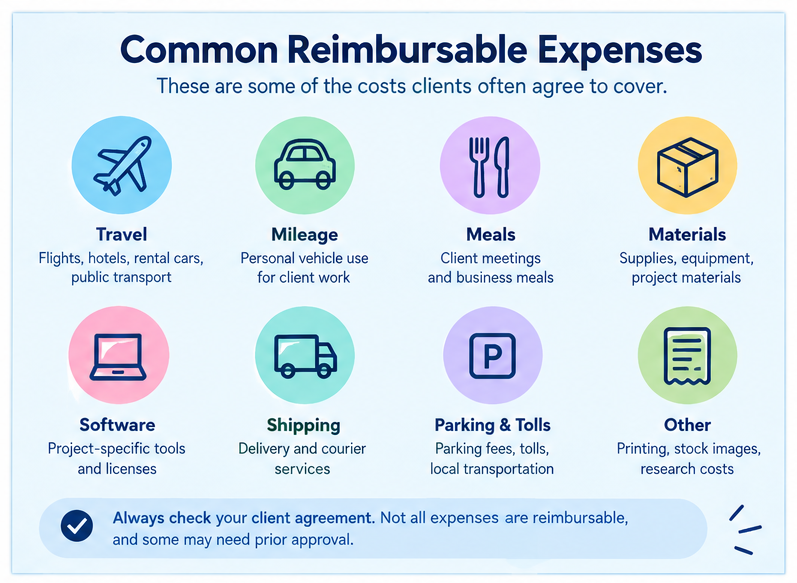
The answer depends on your agreement with the client and the nature of the project. Common billable expenses include:
- Travel expenses
- Airfare
- Hotel costs
- Mileage
- Parking
- Tolls
- Client-related meals
- Shipping and delivery
- Project materials
- Printing
- Special software purchased for a project
- Stock images or licensed assets
- Equipment rented for a project
- Courier services
- Research-related costs
For example, a graphic designer may purchase a specific stock image license for a client’s campaign. A contractor may purchase materials needed for a job. A consultant may pay for transportation to attend an on-site meeting.
These costs can be reimbursable when the client has agreed to cover them.
Your normal operating costs are a different matter. Office rent, your standard laptop, general accounting software, and routine business expenses may already be included in your service pricing.
Check the client agreement before billing an expense.
How to Invoice a Client for Reimbursable Expenses
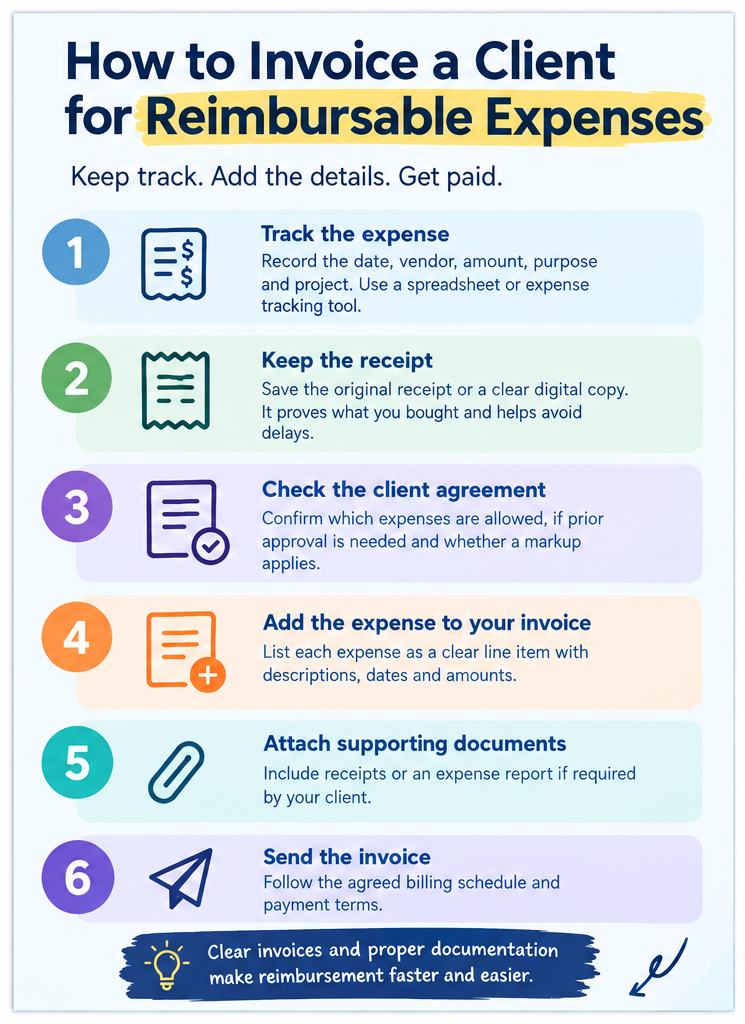
The basic process has six steps.
1. Track the expense when you pay it
Don’t wait until the end of the month and try to reconstruct everything from memory.
Record:
- Date
- Vendor
- Expense type
- Description
- Amount
- Currency
- Client or project
- Receipt location
- Whether tax was included
A simple spreadsheet can work for a small number of expenses. Accounting software or expense tracking software can make the process easier when you handle several projects.
For example:
| Date | Expense | Description | Amount |
|---|---|---|---|
| Sept. 4 | Hotel | Client site visit | $145.00 |
| Sept. 4 | Parking | Client site parking | $18.00 |
| Sept. 5 | Mileage | 82 miles for site visit | $55.76 |
The exact mileage amount should follow the rate or reimbursement method agreed with your client.
2. Keep the receipt
Save the original receipt or a clear digital copy. A bank transaction proves that money left your account. It may not prove what you purchased or why you purchased it.
A receipt usually gives you more useful information, such as:
- Merchant name
- Purchase date
- Items purchased
- Amount
- Tax
- Payment details
If your client asks, “What was this $86 charge?” you can answer immediately. That is much better than searching through old emails while the invoice sits unpaid.
3. Check your client agreement
Before adding an expense to the invoice, check what you agreed to. Look for terms covering:
- Reimbursable expenses
- Travel expenses
- Mileage
- Meals
- Expense limits
- Receipt requirements
- Approval requirements
- Expense markups
- Currency conversion
- Billing frequency
Suppose your agreement says the client will reimburse travel but requires prior approval for expenses above $200.
You paid $420 for an airline ticket without approval. You may have a reimbursement problem even if the travel was related to the project. The contract controls the billing arrangement.
4. Add the expense to your invoice
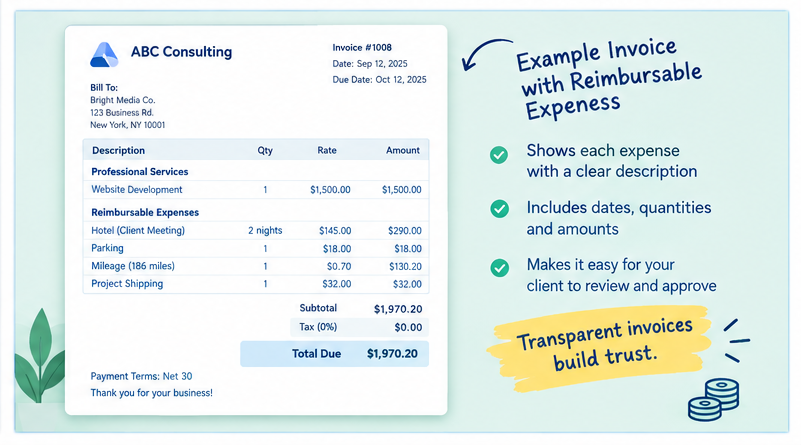
You can include reimbursable expenses on the same invoice as your professional services.
For example:
| Description | Qty | Rate | Amount |
|---|---|---|---|
| Website development | 1 | $1,500 | $1,500 |
| Hotel for client site visit | 2 nights | $145 | $290 |
| Parking | 1 | $18 | $18 |
| Project shipping | 1 | $32 | $32 |
Total: $1,840
You can also create a separate reimbursement invoice if the client requires one. The important thing is that the client can see what they are paying for.
5. Attach supporting documents
If your client requires receipts, attach them to the invoice. You can combine receipts into a PDF or use your accounting or invoicing system to keep them with the transaction. For larger projects, a short expense report can make review easier.
For example:
Expense Report: Project ABC
- Hotel: $290
- Parking: $18
- Shipping: $32
- Total reimbursable expenses: $340
The invoice can then show the $340 expense total.
6. Send the invoice according to the agreed schedule
Some businesses bill expenses monthly. Others invoice them when the project reaches a milestone. Some submit expenses as soon as they occur. Follow the billing terms in your agreement.
If the contract says invoices are due within 30 days, the reimbursement amount usually follows the same payment terms unless the agreement says otherwise.
How Should Reimbursable Expenses Appear on an Invoice?
Clarity matters. A line that says “Expenses: $642” gives the client very little information. A better invoice provides enough detail to identify each expense.
For example:
Reimbursable Expenses
- Hotel, client site visit, Sept. 4 to Sept. 6: $290
- Parking, client meeting: $18
- Shipping of project materials: $32
- Mileage, client site visit: $55.76
Reimbursable expense subtotal: $395.76
This approach makes the expense reimbursement easier to review. If there are dozens of expenses, use a separate expense report and show a summarized amount on the invoice.
Should You Attach Receipts to the Invoice?
If the client asks for receipts, attach them. Even when receipts aren’t required, keeping them is good business practice.
Some clients have strict accounts payable procedures. They may reject or delay an invoice if the required documentation is missing.
A practical approach is to ask during onboarding:
“Would you like receipts attached to reimbursable expenses, or should I include them in a separate expense report?”
That single question can prevent unnecessary back-and-forth.
How to Invoice a Client for Travel Expenses
Travel creates some of the most common reimbursable expenses. A client may agree to pay for:
- Flights
- Hotels
- Rental cars
- Mileage
- Parking
- Tolls
- Public transportation
- Meals
Your invoice should show what each charge relates to.
For example:
Travel Expenses for Chicago Client Meeting
- Round-trip airfare: $410
- Hotel, 2 nights: $320
- Local transportation: $46
- Parking: $28
- Meals: $72
Total travel expenses: $876
Don’t add a travel expense without checking the agreement. Some clients have limits on hotel rates, meal allowances, or transportation.
How to Bill a Client for Mileage
Mileage needs a little more documentation than a normal purchase.
Record:
- Date of travel
- Starting location
- Destination
- Business purpose
- Total distance
- Applicable reimbursement rate
- Total reimbursement amount
For example:
Mileage: 186 business miles × agreed rate of $0.70 = $130.20
The rate in this example is for illustration. Use the rate required by your client agreement or applicable reimbursement policy.
Keep your mileage records with the invoice documentation.
Can You Charge a Markup on Reimbursable Expenses?
Sometimes, but the answer depends on your agreement. Suppose you pay $100 for a project-related service.
You could have an agreement that says the client reimburses the exact $100. You could also have an agreement that allows a stated administrative fee or markup.
These are different billing arrangements. Do not quietly turn a $100 expense into a $120 charge because you think the extra amount is reasonable. If you want to apply a markup, put the rule in the contract before the expense occurs.
For example:
“Approved third-party project expenses will be reimbursed at cost.”
That means the client pays the actual expense.
Another agreement might state that approved third-party expenses include a specific administrative fee.
The contract should make the method clear.
Reimbursable Expenses vs. Business Expenses
These terms can cause confusion. A business expense is a cost your business incurs while operating.
A reimbursable expense is a cost that your client has agreed to repay.
Some expenses can be both.
For example, you might purchase $300 of materials specifically for a client’s project. Your business paid the vendor, so it is a business expense from your accounting perspective. If the client agreed to reimburse it, you can also bill the client for that amount.
The accounting treatment depends on your business structure, accounting method, tax rules, and local requirements. For tax or accounting questions, speak with a qualified accountant in your jurisdiction.
How Freelancers Can Handle Reimbursable Expenses
Freelancers often pay project expenses before receiving payment from the client. That can create a cash flow problem.
Suppose you charge $2,000 for a project and spend another $600 on approved project expenses. Your client may owe $2,600, but you’ve already spent the $600.
A simple system can prevent those expenses from getting lost. Create a separate expense record for each client project. For each expense, record:
Client → Project → Date → Vendor → Category → Amount → Receipt
Then review the expense list before creating your invoice. This takes a few minutes and can prevent missed billable expenses.
A Simple Reimbursable Expense Invoice Example
Here’s a practical example for a freelance consultant.
Professional Services: Consulting services for September: $2,000
Reimbursable Expenses
Hotel for client meeting: $240
Airfare: $380
Local transportation: $42
Parking: $20
Printing: $35
Reimbursable expenses: $717
Invoice subtotal: $2,717
The invoice can include links or attachments for the supporting receipts if the client requires them. The client can then see exactly how the $717 reimbursement amount was calculated.
Common Mistakes When Billing Clients for Expenses
Small mistakes can cause payment delays.
1. Billing expenses that weren’t approved: Check the contract before submitting expenses.
2. Providing no description: “Miscellaneous expense” doesn’t tell the client much. Use a clear description.
3. Losing receipts: Create a digital receipt folder for every project.
4. Mixing personal and client expenses: Keep client-related expenses separate in your records.
5. Adding an undisclosed markup: If you charge a markup, state it in the agreement.
6. Forgetting expenses until months later: Bill expenses according to the agreed billing cycle.
7. Using unclear invoice line items: The client should understand what each amount represents.
8. Ignoring currency conversion: For international clients, record the original currency and the conversion method when appropriate.
9. Charging the same expense twice: Reconcile your expense list with previous invoices before sending a new one.
10. Failing to check client requirements: Some companies require purchase orders, expense reports, receipt attachments, or specific invoice formats.
How to Track Billable Expenses Before Invoicing
You don’t need an expensive system to start. A spreadsheet can work well if you have a small number of clients. Useful columns include:
| Field | Example |
|---|---|
| Client | ABC Media |
| Project | Website Redesign |
| Date | Sept. 12 |
| Category | Travel |
| Vendor | City Hotel |
| Description | Client site visit |
| Amount | $145 |
| Receipt | Attached |
| Billable | Yes |
| Invoiced | No |
The “Invoiced” column is particularly useful. It can prevent an expense from being forgotten or billed twice. If you manage many projects, consider using accounting or invoice software with expense tracking.
Using an Invoice Generator for Reimbursable Expenses
An online invoice generator can be useful when you need to create a professional invoice quickly. The basic workflow is simple:
- Enter your business details.
- Add your client’s information.
- Add your services.
- Add reimbursable expenses as separate line items.
- Check the totals.
- Add payment terms.
- Attach receipts if required.
- Send or download the invoice.
For a small business or freelancer, the main benefit is consistency. Your service charges and expense charges appear in one clear document.
Before sending the invoice, check the numbers manually. Software can calculate totals, but you still need to confirm that every expense is allowed under your agreement.
How to Make Client Expense Reimbursement Easier
A good reimbursement process starts before the expense happens. When you begin a project, agree on:
- Which expenses are reimbursable
- Whether prior approval is required
- Whether receipts are required
- Mileage rules
- Travel limits
- Meal limits
- Payment terms
- Currency rules
- Whether expenses are billed at cost
- Whether an administrative fee applies
Put those terms in writing. That makes the later invoice much easier to review.
Final Checklist Before Sending an Expense Invoice
Before you click Send, check these items:
Every expense relates to the client or project
The expense is allowed under the agreement
Receipts are saved
Dates are correct
Amounts are correct
Currency is clear
Mileage calculations are documented
Expenses aren’t already invoiced
Any markup follows the contract
The invoice has clear descriptions
Required supporting documents are attached
Payment terms are included
Five minutes of checking can save several emails later.
Frequently Asked Questions
1. What are reimbursable expenses?
Reimbursable expenses are costs that a business, freelancer, or contractor pays and later charges to a client under an agreed reimbursement arrangement.
2. How do I invoice a client for reimbursable expenses?
Track the expense, keep the receipt, confirm that the expense is allowed, add it to the invoice as a clear line item, attach supporting documents when required, and send the invoice according to the agreed billing terms.
3. Can I include reimbursable expenses on the same invoice as my services?
Yes. You can usually list your professional services and reimbursable expenses on the same invoice when the client agreement allows it.
4. Should reimbursable expenses be separate line items?
Separate line items usually make the invoice easier to review. For a large number of expenses, you can use a separate expense report and include the total on the invoice.
5. Do I need receipts for client expense reimbursement?
That depends on the client agreement and applicable requirements. Even when receipts aren’t required, keeping them gives you documentation for the expense.
6. Can freelancers charge clients for expenses?
Yes, freelancers can charge clients for approved project expenses when their agreement allows reimbursement.
7. Can I charge a client for travel expenses?
Yes, if travel expenses are covered by the client agreement. Check whether the agreement has limits for airfare, hotels, meals, mileage, or transportation.
8. How do I bill a client for mileage?
Record the date, business purpose, route or destination, miles driven, applicable reimbursement rate, and total amount. Then list the mileage expense on the invoice.
9. Should I attach receipts to my client invoice?
Attach receipts when the client requires them. You can also provide them voluntarily when they make a large or unusual expense easier to verify.
10. Can I mark up reimbursable expenses?
You can charge a markup when your agreement with the client allows it. The contract should clearly state how the markup works.
11. What is the difference between billable and reimbursable expenses?
The terms can overlap. A billable expense is a cost you charge to the client. A reimbursable expense is a cost the client agrees to repay. The exact meaning depends on the billing agreement.
12. Can I bill a client for materials?
Yes, when the materials are related to the client’s project and the agreement allows you to charge them to the client.
13. How should expenses appear on an invoice?
Use clear descriptions that identify the expense and, when useful, the project, date, or purpose. Avoid vague descriptions such as “miscellaneous.”
14. Can I create a separate invoice for expenses?
Yes. Some businesses use a separate reimbursement invoice, particularly when expenses need to be billed before the next regular service invoice.
15. What should an expense reimbursement invoice include?
It should normally include the seller and client details, invoice number, date, expense descriptions, amounts, applicable taxes or fees, total amount due, payment terms, and supporting documentation when required.
16. How do I track reimbursable expenses?
You can use a spreadsheet, accounting software, expense tracking software, or an invoicing system. Record each expense as soon as you incur it.
17. Can I bill a client for software expenses?
You can bill project-specific software expenses when the client has agreed to cover them. Check the contract before purchasing the software.
18. What happens if a client refuses to reimburse an expense?
Review the agreement and the documentation for the expense. If the expense required prior approval and you didn’t obtain it, the client may have grounds to reject it. Discuss disputed expenses with the client before treating them as collectible amounts.
19. When should I invoice a client for reimbursable expenses?
Follow your contract. Some agreements allow expenses to be billed immediately, while others require monthly billing or submission with the next service invoice.
20. What’s the easiest way to create an expense reimbursement invoice?
An invoice generator or accounting system can create the invoice quickly. Enter your client information, list your services and reimbursable expenses separately, check the totals, and attach the required receipts.
Final Takeaway
Client expense reimbursement becomes much easier when the rules are agreed before the expense occurs.
Track every cost. Keep the receipts. Use clear invoice descriptions. Separate services from expenses. Follow the client agreement, especially when it covers approval limits, travel, mileage, receipts, or markups.
For freelancers and small businesses, the process can be simple: record the expense, document it, add it to the invoice, and bill it according to the agreement.
That keeps the client informed and gives you a cleaner record of what you’re owed.
When you regularly invoice clients for reimbursable expenses, a consistent expense-tracking and invoicing process can save time and reduce billing mistakes.

Akbar Ali is the Founder of InvoiceGeneratorPro.io, a platform dedicated to helping freelancers, small businesses, startups, agencies, and entrepreneurs create professional invoices quickly and efficiently. With years of experience in digital business, SEO content strategy, and online entrepreneurship, he focuses on developing practical tools and educational resources that simplify invoicing, payment management, and financial documentation.As a business writer and digital entrepreneur, Akbar creates in-depth guides, industry insights, and actionable content covering invoicing, freelancing, accounting basics, business finance, taxation, productivity, and payment solutions. His goal is to make complex financial processes easy to understand while helping professionals save time and present their businesses more professionally.Through InvoiceGeneratorPro.io, he continues to build reliable, user-friendly solutions that empower businesses worldwide to streamline their billing workflows and improve financial organization.
Akbar Ali