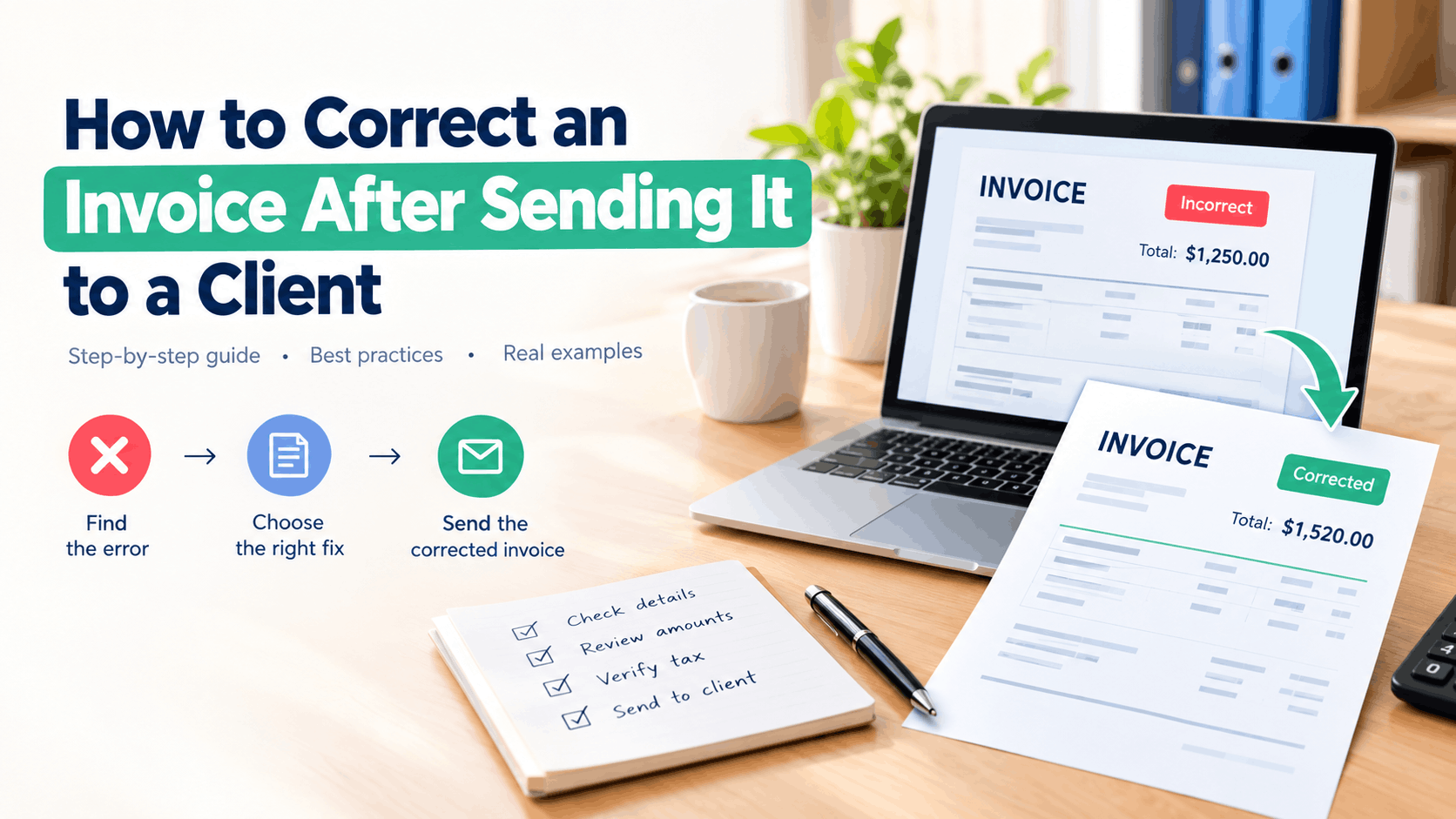
You send an invoice to a client, close your laptop, and move on to the next task. Then you notice it.
The invoice says $1,250 instead of $1,520.
Or perhaps the client’s billing address is wrong. Maybe you entered the wrong tax amount, used the wrong invoice date, forgot a line item, or gave the client an incorrect due date.
It happens.
For freelancers, small business owners, agencies, contractors, and accountants, invoice errors are part of normal business administration. The important thing is knowing how to correct an invoice after sending it without creating a second problem.
The right process depends on what went wrong, whether the client has paid, and how your accounting system handles invoices.
This guide explains how to fix an incorrect invoice, when to issue a replacement invoice, when a credit note may be appropriate, and how to communicate the correction clearly.
Can You Correct an Invoice After Sending It?
Yes, an invoice can usually be corrected after you’ve sent it to a client, but the exact method depends on your accounting process and local tax rules.
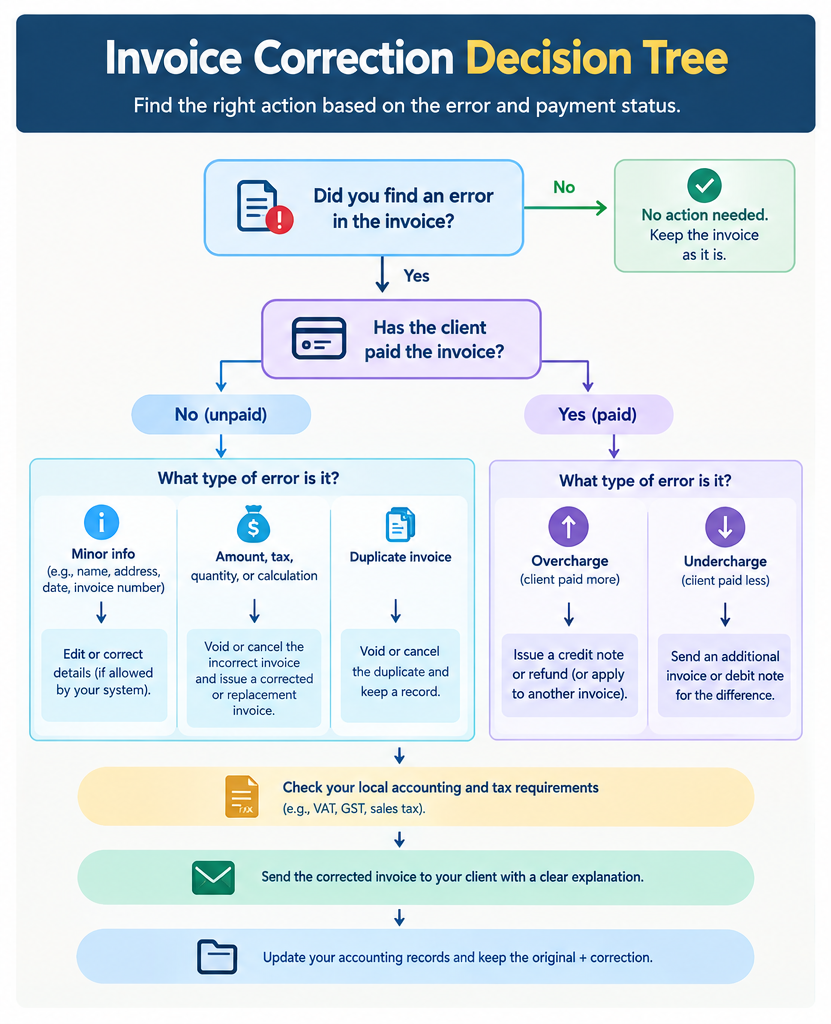
If the invoice has not been paid, correcting the error is often straightforward. You can normally void or cancel the incorrect invoice and issue a corrected invoice with the right information.
If the invoice has already been paid, the process can require an accounting adjustment, credit note, debit note, or another correction method depending on the situation.
The first step is simple:
Find out exactly what is wrong with the invoice.
Don’t immediately delete the invoice and create another one. That can make your invoice records harder to follow, especially if your business uses sequential invoice numbers.
A clean invoice correction process should leave a clear record of what happened.
Common Invoice Mistakes That Need Correction
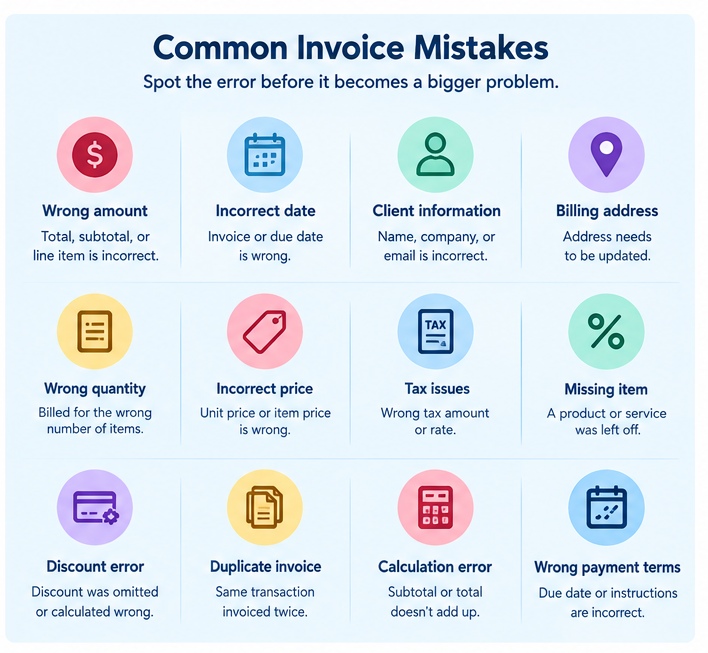
Invoice errors come in many forms. Some are minor, while others can affect payment, tax reporting, or your accounting records.
Here are common reasons a business may need to correct an invoice:
- Wrong invoice amount: The total, subtotal, or line-item price is incorrect.
- Incorrect invoice date: The date doesn’t match the actual transaction.
- Wrong client information: The customer’s name, company name, or billing details are incorrect.
- Wrong billing address: The address needs to be changed before payment or record keeping.
- Incorrect invoice number: A number was entered incorrectly or duplicated.
- Wrong quantity: You billed for five units when the client ordered four.
- Incorrect unit price: The price per product or service is wrong.
- Missing line item: A service or product was left off the invoice.
- Wrong tax amount: Sales tax, VAT, or GST was calculated incorrectly.
- Wrong tax rate: The correct tax rate wasn’t applied.
- Incorrect discount: A discount was omitted or calculated incorrectly.
- Wrong payment terms: The due date or payment instructions are incorrect.
- Duplicate invoice: The same transaction was accidentally invoiced twice.
- Calculation error: The subtotal, tax, or final invoice total doesn’t add up.
A small typo in a customer’s address may require a simple correction. A wrong tax amount or duplicate invoice may require more careful accounting treatment.
How to Correct an Invoice After Sending It
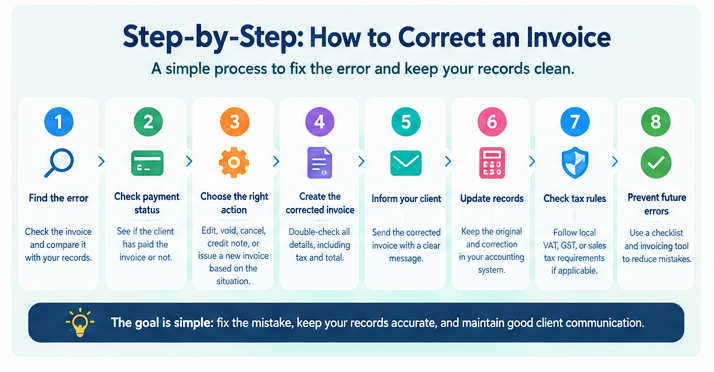
The safest process starts with identifying the error and checking the invoice status.
Step 1: Check What Is Wrong
Open the invoice and compare it with the original quote, order, contract, timesheet, or other supporting records.
Write down the exact correction.
For example:
Original invoice:
Service fee: $1,000
Tax: $100
Total: $1,100
Correct amount:
Service fee: $1,200
Tax: $120
Total: $1,320
This prevents you from fixing one error while creating another.
Step 2: Check Whether the Client Has Paid
This changes how you should handle the correction.
If the client hasn’t paid, you generally have more flexibility. You may be able to void or cancel the incorrect invoice and issue a corrected invoice.
If the client has already paid, don’t simply change the old invoice and pretend the original never existed. Your accounting records need to reflect what happened.
The correction may require a credit note, debit note, adjustment, refund, or another accounting entry.
Step 3: Check Your Invoicing System
Different invoice software handles corrections differently. Some systems let you edit draft invoices but prevent changes to finalized invoices. Others allow you to void an invoice and create a replacement.
For example, a small business may use QuickBooks, FreshBooks, a POS app, PayPal invoicing, or its own invoice generator. The exact buttons and workflow will vary.
The accounting principle is more important than the button you click:
Keep a record of the original invoice and the correction.
Step 4: Void or Cancel the Incorrect Invoice When Appropriate
If the invoice hasn’t been paid and your accounting process permits it, you may be able to void or cancel the incorrect invoice.
Record why it was cancelled.
For example:
Invoice INV-1048 cancelled due to incorrect service amount. Replacement invoice INV-1049 issued.
That gives you a simple record of the correction.
Step 5: Create the Corrected Invoice
Prepare a new invoice with the correct information.
Check:
- Client name
- Business name
- Billing address
- Invoice number
- Invoice date
- Due date
- Product or service description
- Quantity
- Unit price
- Discount
- Tax rate
- Tax amount
- Total amount
- Payment instructions
- Bank or payment details
Take an extra minute here.
You’ve already found one mistake. Don’t send the corrected invoice before checking it.
Step 6: Give the Client a Clear Explanation
You don’t need a long apology.
Tell the client that the previous invoice contained an error, explain what changed, and ask them to use the corrected invoice.
For example:
The previous invoice contained an incorrect service amount. Please disregard that invoice and use the attached corrected invoice for payment.
Clear communication prevents confusion.
When Should You Edit an Invoice?
Editing an invoice depends on its status and your accounting process.
A draft invoice can normally be edited freely because it hasn’t been finalized or sent.
A finalized invoice is different. Once it has been sent to a client, changing the original record can make your accounting history difficult to track.
If your system allows you to edit sent invoices, check whether the change is recorded in the invoice history or audit trail.
For businesses that need reliable records, keeping the original invoice and documenting the correction is usually cleaner than silently changing historical information.
When Should You Void or Cancel an Invoice?
Voiding or cancelling an invoice may be appropriate when the invoice is incorrect and hasn’t been paid.
For example, you accidentally create an invoice for: $850
when the correct amount should be: $1,050
You could void the incorrect invoice and create a new invoice with the correct amount. The exact treatment depends on your accounting software and local requirements.
Don’t cancel an invoice simply because you don’t like its appearance. If it has already been recorded for tax or accounting purposes, check the appropriate correction procedure first.
When Should You Issue a Credit Note?
A credit note, sometimes called a credit memo, can be used to reduce the amount owed under an existing invoice.
This can apply when:
- You overcharged the client.
- A product was returned.
- A service was cancelled.
- A discount was missed.
- Part of an order was refunded.
- The client has already been billed and the amount needs to be reduced.
For example, suppose you billed a client $2,000 but discover that $300 should not have been charged.
A credit note for $300 can reduce the amount due to $1,700, depending on the accounting method being used.
Credit note rules vary by country, especially when VAT or GST is involved. Businesses should follow the rules that apply to their jurisdiction and tax registration status.
Corrected Invoice vs. Replacement Invoice
These terms are sometimes used interchangeably, but businesses may use them differently.
A corrected invoice is an invoice issued to fix incorrect information on a previous invoice.
A replacement invoice is a new invoice intended to replace the incorrect invoice.
For practical purposes, the important thing is that your records clearly show:
- Which invoice was incorrect.
- Why it was corrected.
- Which invoice replaced it.
- Whether the original invoice was voided, cancelled, or otherwise adjusted.
For example:
Original: INV-1050
Status: Cancelled due to incorrect tax calculation
Replacement: INV-1051
Status: Corrected invoice
This creates a much cleaner record than deleting INV-1050 with no explanation.
What If the Client Has Already Paid?
This situation needs more care. Suppose you sent an invoice for $900 and the client paid $900. Later, you discover that the correct amount should have been $850.
You can’t treat the $50 difference as though it never happened. Your records should show the correction.
Depending on your accounting and tax rules, you may need to issue a credit note for $50 and refund the difference, or apply the credit to another invoice.
The same principle applies if the correct amount should have been higher.
Suppose the invoice was $850, but the correct amount was $900. You may need to issue an additional invoice or debit note for the $50 difference.
The correct treatment depends on the transaction and applicable accounting and tax rules. If the amount is significant, check with your accountant before making the adjustment.
How to Send a Corrected Invoice to a Client
A corrected invoice email should be short and specific.
Your client needs to know three things:
What happened. What changed. Which invoice should they use.
A useful subject line is:
Corrected Invoice INV-1051
Then explain the correction in one or two sentences.
Corrected Invoice Email Example
Subject: Corrected Invoice INV-1051
Hi Sarah,
I noticed an error in the previous invoice, INV-1050. The service amount was entered incorrectly.
I’ve attached the corrected invoice, INV-1051. Please disregard the previous invoice and use the corrected invoice for your records and payment.
Sorry for the confusion, and thank you for your understanding.
Best,
Akbar
You don’t need to write a five-paragraph explanation for a $20 typo. Give the client enough information to identify the correct document.
Should the Corrected Invoice Have a New Invoice Number?
In many accounting systems, the corrected invoice should have its own invoice number, particularly when the original invoice has already been issued. For example:
- Original: INV-2005
- Corrected: INV-2006
The original invoice can then be marked as void, cancelled, or replaced according to your system. Don’t randomly reuse invoice numbers. Your invoice numbering system should remain consistent. If your country’s tax rules require a specific correction format, follow those requirements.
How Invoice Corrections Affect Small Business Invoicing
For small businesses, invoice corrections can affect more than one document.
An invoice may connect to:
- Accounts receivable
- Sales records
- Tax records
- Payment records
- Customer statements
- Bank reconciliation
- Bookkeeping software
- Monthly financial reports
That’s why good small business invoicing requires more than creating a PDF and emailing it.
You need accurate records.
A corrected invoice should match the underlying transaction. If your bookkeeping software still shows $1,000 while your corrected invoice shows $1,200, you’ll have a reconciliation problem later.
This is especially important at the end of a month, quarter, or tax period.
Tax, VAT, and GST Corrections
Tax treatment depends heavily on the country and type of tax. A wrong sales tax amount may need a different correction from a simple customer-name typo. The same applies to VAT and GST invoices.
For example, if you issue a VAT invoice with the wrong VAT amount, the correction may need to follow specific invoice and tax-record requirements. A business registered for GST may also have specific rules for correcting a GST invoice.
Don’t assume that one country’s invoice correction procedure applies everywhere. If your business operates across borders, check the tax rules for the relevant jurisdiction.
How to Correct a Wrong Invoice Number
A wrong or duplicate invoice number can create accounting confusion. Suppose you accidentally send: INV-3008
to two different customers.
Don’t silently change the number on one copy if your system has already recorded it. Check your invoice numbering process and determine which document needs correction. Your accounting system should show a clear sequence and record of cancelled or voided invoices where applicable.
A simple numbering system can prevent many of these problems:
INV-2026-001
INV-2026-002
INV-2026-003
The exact format doesn’t matter as much as consistency.
How to Correct an Invoice With the Wrong Amount
A wrong invoice amount is one of the most common errors. Start by checking the line items.
For example:
| Item | Original | Correct |
|---|---|---|
| Website design | $800 | $800 |
| Hosting | $100 | $120 |
| Maintenance | $200 | $200 |
| Subtotal | $1,100 | $1,120 |
The correction may seem small, but the final invoice total, tax, and payment amount must all match. Don’t change only the final total. Correct the underlying line item that caused the error. That makes the invoice easier for the client and your accountant to understand.
How to Correct an Invoice With the Wrong Tax
Tax mistakes need extra care. Suppose the taxable amount is $1,000 and the invoice uses a 10% tax rate.
The tax should be: $1,000 × 10% = $100
If you accidentally charge $150, the invoice total is wrong.
Depending on the tax system and whether the invoice has been reported, you may need a corrected tax invoice, credit note, or another formal adjustment.
If you’re unsure, ask a qualified accountant or tax professional. A small invoice correction is easier to handle than a tax reporting problem created by an incorrect correction.
How to Prevent Invoice Errors
The easiest invoice error to fix is the one you catch before sending. Before sending an invoice, check five areas:
1. Customer Details: Confirm the client’s name, company name, email address, and billing address.
2. Invoice Details: Check the invoice number, invoice date, and due date.
3. Line Items: Compare each product or service with your quote, contract, purchase order, or timesheet.
4. Calculations: Check quantities, prices, discounts, tax, subtotal, and total.
5. Payment Details: Make sure your bank account, payment link, currency, and payment instructions are correct.
For busy freelancers, this can take less than two minutes.
That two-minute check can save a much longer email exchange later.
Use an Invoice Generator to Reduce Manual Errors
Creating invoices manually in a spreadsheet can work when you have a small number of clients. As invoice volume increases, repeated manual entry creates more opportunities for mistakes.
An online invoice generator can make the process easier by giving you a consistent invoice format and reusable fields.
You can create a professional invoice, review the line items, and send the finished document to your client.
For businesses that want a simple way to create invoices without complicated accounting software, an online invoice maker can be enough for basic invoicing needs.
If you need more advanced features, such as recurring billing, payment tracking, accounting integration, or detailed audit records, dedicated invoicing software may be more suitable.
A Simple Invoice Correction Checklist
Before you send a corrected invoice, run through this checklist:
Identify the exact invoice error.
Check whether the client has paid.
Review the original invoice.
Check your accounting records.
Void or cancel the original when appropriate.
Create the corrected or replacement invoice.
Use a new invoice number when required.
Recheck every line item.
Verify tax calculations.
Confirm the total amount.
Tell the client which invoice to use.
Keep the original and correction records.
Update your bookkeeping system.
This process works for many common invoice problems without making the situation more complicated than it needs to be.
Final Checklist for Correcting a Sent Invoice
An invoice mistake doesn’t need to turn into a client dispute.
Handle it quickly and keep your records clear.
Identify the error. Check payment status. Review the original invoice. Correct it using the appropriate method. Give the new invoice a clear reference. Tell the client which invoice to use. Keep the correction in your accounting records.
For small business invoicing, consistency matters. A clean correction process makes it easier to manage payments, bookkeeping, taxes, and client communication.
And before you hit Send on that corrected invoice, read it one more time.
Two minutes of checking can save an hour of fixing.

Akbar Ali is the Founder of InvoiceGeneratorPro.io, a platform dedicated to helping freelancers, small businesses, startups, agencies, and entrepreneurs create professional invoices quickly and efficiently. With years of experience in digital business, SEO content strategy, and online entrepreneurship, he focuses on developing practical tools and educational resources that simplify invoicing, payment management, and financial documentation.As a business writer and digital entrepreneur, Akbar creates in-depth guides, industry insights, and actionable content covering invoicing, freelancing, accounting basics, business finance, taxation, productivity, and payment solutions. His goal is to make complex financial processes easy to understand while helping professionals save time and present their businesses more professionally.Through InvoiceGeneratorPro.io, he continues to build reliable, user-friendly solutions that empower businesses worldwide to streamline their billing workflows and improve financial organization.
Akbar Ali