Getting paid should be simple. You finish the work, send the invoice, and receive the payment. Real life rarely follows that pattern.
Invoices get buried in email inboxes. Clients forget payment dates. Small mistakes create delays. A missing purchase order number or incorrect tax calculation can turn a seven-day payment into a thirty-day wait.
Those delays affect more than your bank balance. They interrupt cash flow, make budgeting harder, and create unnecessary follow-up work. For freelancers, one late invoice can delay personal expenses. For growing businesses, dozens of unpaid invoices can slow hiring, inventory purchases, or marketing plans.
That’s why invoice management deserves attention.
A good invoice management process keeps every invoice organized from the moment it’s created until the payment reaches your account. It reduces errors, shortens payment cycles, and gives you a clear picture of who has paid, who hasn’t, and which invoices need attention.
Whether you send five invoices each month or five hundred, the principles remain the same. Clear records, consistent processes, and timely follow-ups make collecting payments much easier.
This guide explains everything you need to know about invoice management, including workflows, best practices, common mistakes, software options, and practical tips for freelancers, accountants, and business owners.
What Is Invoice Management?
Invoice management is the process of creating, sending, tracking, organizing, approving, and recording invoices until payment is received and properly documented.
The process includes much more than generating an invoice. A complete invoice management system usually includes:
- Creating accurate invoices
- Assigning invoice numbers
- Adding tax information
- Sending invoices to customers
- Tracking payment status
- Sending payment reminders
- Recording received payments
- Managing overdue invoices
- Keeping invoices for accounting and tax purposes
Every invoice follows a lifecycle. It begins when goods or services are delivered and ends after payment has been received, reconciled, and archived. Without a structured process, businesses often face duplicate invoices, missing records, incorrect billing amounts, and payment disputes.
A Simple Example: Consider a freelance web designer.
After completing a website project, the designer creates an invoice with payment terms of 15 days. The client receives the invoice by email. Seven days later, the designer checks whether payment has arrived. If payment remains outstanding after the due date, a reminder email is sent.
Once payment arrives, the invoice status changes from Pending to Paid, and accounting records are updated. That entire sequence is invoice management. The same process applies to consulting firms, marketing agencies, construction companies, online stores, healthcare providers, and enterprise organizations. The only difference is the number of invoices and the level of automation.
Why Invoice Management Matters
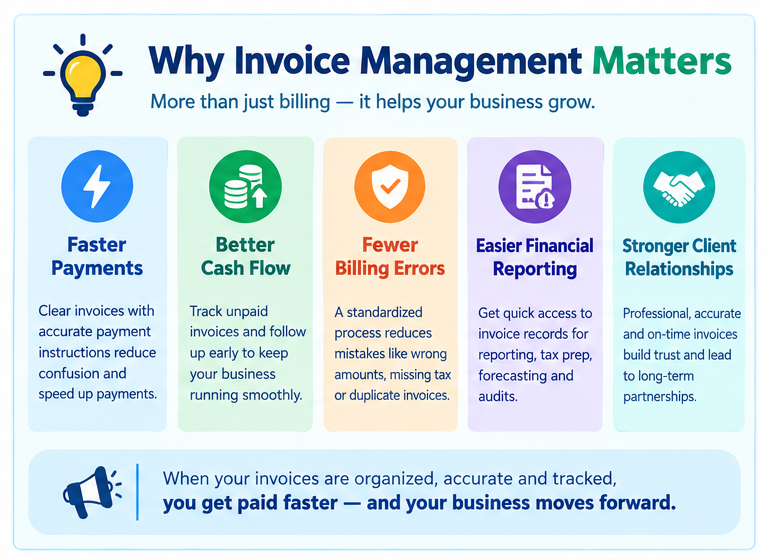
Many businesses focus heavily on sales and customer acquisition. Billing often receives attention only when payments become late. That creates unnecessary problems. Strong invoice management gives businesses greater control over their financial operations.
Faster Payments:
Clear invoices with accurate payment instructions reduce confusion. Customers understand exactly what they owe, when payment is due, and which payment methods they can use. That reduces payment delays.
Better Cash Flow:
Cash flow keeps every business operating. Regular invoice tracking allows companies to identify unpaid invoices before they become serious collection problems. Businesses that consistently follow up on outstanding invoices usually receive payments faster than businesses that wait for customers to respond first.
Fewer Billing Errors:
Manual billing increases the chance of mistakes.
Examples include:
- Incorrect invoice numbers
- Wrong customer names
- Missing tax information
- Duplicate invoices
- Incorrect pricing
- Missing payment terms
Each mistake increases the chance of delayed payment. A standardized invoice management process reduces those risks.
Easier Financial Reporting: Every invoice tells part of your company’s financial story.
Well-organized invoice records simplify:
- Monthly reporting
- Profit analysis
- Tax preparation
- Cash flow forecasting
- Accounts receivable reporting
- Business audits
Instead of searching through folders or email chains, finance teams can locate invoice records within seconds.
Stronger Client Relationships:
Professional invoices create confidence. Clients appreciate invoices that are accurate, easy to read, and delivered on time. Consistent invoicing also reduces misunderstandings about project scope, payment schedules, and outstanding balances. Good invoice management supports long-term customer relationships because communication remains clear throughout the billing process.
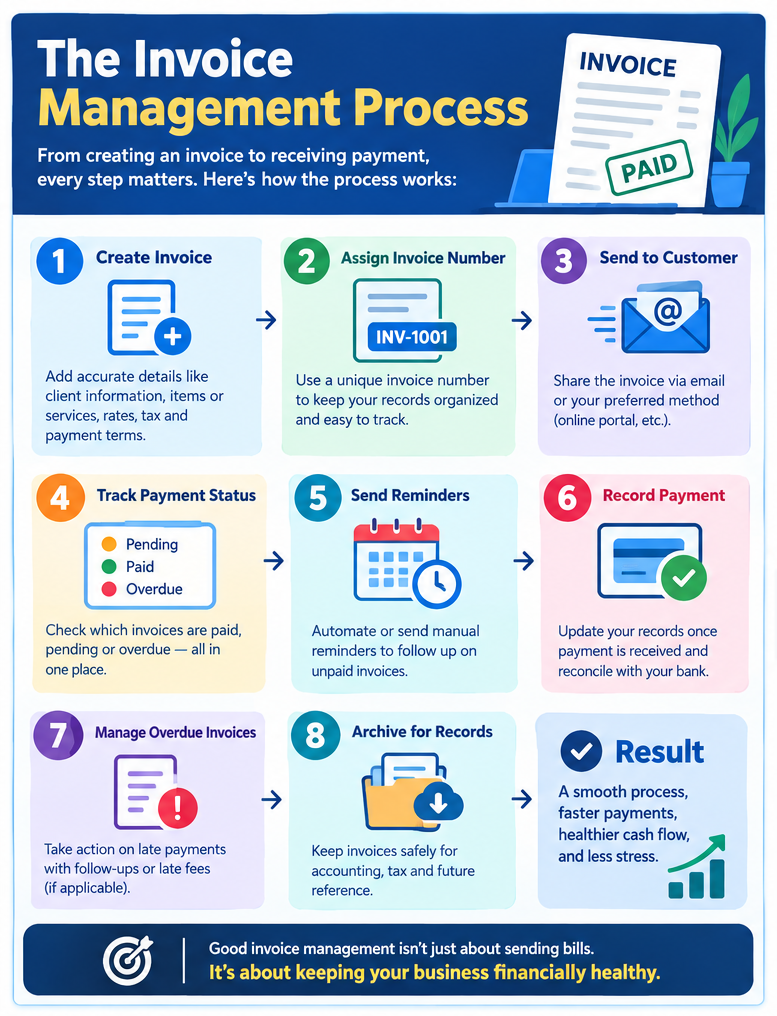
The Complete Invoice Management Process
Every business follows a slightly different workflow, yet most invoice management systems include the same core stages.
Step 1: Create the Invoice
After completing a product delivery or service, prepare an invoice containing:
- Business name
- Customer information
- Invoice number
- Invoice date
- Due date
- Itemized products or services
- Taxes
- Discounts
- Total amount
- Payment methods
- Payment terms
Accurate information at this stage prevents future disputes.
Step 2: Review the Invoice
Before sending the invoice, verify:
- Customer name
- Billing address
- Tax rates
- Pricing
- Quantity
- Purchase order numbers
- Currency
- Due date
Many businesses use internal approval workflows before invoices are sent.
Step 3: Send the Invoice
Invoices may be delivered through:
- Client portals
- Accounting software
- PDF attachments
- ERP systems
- Electronic invoicing (e-Invoicing)
Sending invoices immediately after completing work often shortens payment times.
Step 4: Track Invoice Status
Tracking allows businesses to monitor:
- Draft
- Sent
- Viewed
- Pending
- Partially Paid
- Paid
- Overdue
- Cancelled
Real-time tracking prevents invoices from disappearing into long email conversations.
Step 5: Send Payment Reminders
Customers occasionally overlook invoices. Friendly reminders before and after the due date encourage timely payment without creating unnecessary tension. Many invoice management systems schedule reminders automatically.
Step 6: Receive Payment
Customers may pay through:
- Bank transfer
- Credit card
- Debit card
- PayPal
- Stripe
- Wise
- ACH transfer
- Digital wallets
After payment arrives, update the invoice status immediately.
Step 7: Record and Archive
Paid invoices remain important long after payment.
Businesses retain invoices for:
- Tax compliance
- Financial statements
- Audits
- Customer history
- Revenue tracking
- Expense reconciliation
Digital storage makes future retrieval much easier than paper filing systems.
Common Invoice Types Used in Invoice Management
Different situations require different invoice formats. Understanding each type improves your invoice management process.
Standard Invoice: The most common invoice. Used after products or services have been delivered.
Proforma Invoice: A preliminary invoice sent before work begins.It estimates costs but does not request payment immediately.
Commercial Invoice: Used in international trade. Contains customs and shipping information required for imports and exports.
Recurring Invoice:
Ideal for:
- Monthly subscriptions
- Maintenance contracts
- SaaS businesses
- Membership services
Recurring invoices reduce repetitive manual work.
Credit Invoice: Issued when a seller refunds money or adjusts an earlier invoice.
Debit Invoice: Sent when additional charges need to be added after the original invoice.
Interim Invoice: Used for large projects completed in multiple phases. Construction companies and software development firms frequently issue interim invoices during long-term projects.
Final Invoice: The last invoice issued after completing a project. It reflects the remaining balance after previous milestones or advance payments.
Past Due Invoice: Sent after an invoice passes its payment deadline. It reminds customers that payment remains outstanding and may include late payment charges if stated in the original agreement.
Why Choosing the Right Invoice Type Matters
Selecting the correct invoice type keeps your accounting records accurate and reduces confusion for both your business and your customers.
For example:
- A freelancer working on a six-month branding project may send interim invoices after each milestone.
- A SaaS company usually sends recurring invoices every month.
- An exporter shipping products overseas needs a commercial invoice for customs clearance.
- A retailer issuing a customer refund creates a credit invoice.
Using the correct invoice type keeps payment records organized, simplifies bookkeeping, and supports a more efficient invoice management system.
Manual vs. Automated Invoice Management
Many businesses begin with manual invoicing because it’s familiar and doesn’t require new software. As the number of invoices grows, though, manual work often creates delays and increases the chance of mistakes.
Automated invoice management reduces repetitive tasks by using software to create, send, track, and organize invoices. That doesn’t mean automation fits every business. The right choice depends on your invoice volume, budget, and workflow.
Let’s compare both approaches.
What Is Manual Invoice Management?
Manual invoice management means people handle every stage of the invoicing process themselves.
A typical workflow looks like this:
- Create an invoice in Word, Excel, or Google Docs.
- Convert it to PDF.
- Send it by email.
- Record it in a spreadsheet.
- Check your bank account for payment.
- Send reminder emails manually.
- Update payment records.
This process works well for businesses with only a few invoices each month.
Advantages of Manual Invoice Management
- No software subscription fees
- Full control over invoice design
- Easy to start
- Suitable for freelancers or new businesses
Disadvantages
- Time-consuming
- Easy to forget follow-ups
- Higher risk of duplicate invoices
- Difficult to track hundreds of invoices
- More data entry errors
- Limited reporting
Example:
A freelance photographer sends five invoices every month. Creating invoices manually takes only a few minutes, so specialized software may not be necessary.
What Is Automated Invoice Management?
Automated invoice management uses invoicing or accounting software to complete repetitive billing tasks.
Instead of manually updating spreadsheets, the software records invoice status automatically.
Many systems can:
- Generate invoice numbers automatically
- Calculate taxes
- Send invoices instantly
- Schedule recurring invoices
- Track payment status
- Send reminder emails
- Record completed payments
- Create financial reports
Automation saves significant time once invoice volume increases.
Advantages of Automated Invoice Management
Businesses using automated invoice management often notice improvements in several areas.
Faster Invoice Creation: Customer information, tax settings, and payment terms are stored in the system. Creating a new invoice may take less than one minute.
Better Payment Tracking:
You always know whether an invoice is:
- Draft
- Sent
- Viewed
- Due
- Overdue
- Paid
This visibility makes accounts receivable easier to manage.
Fewer Errors:
Automatic calculations reduce mistakes involving:
- Taxes
- Discounts
- Totals
- Invoice numbering
Human review is still important, but software catches many common errors.
Automatic Payment Reminders: Following up on overdue invoices can feel uncomfortable. Automation removes much of that burden by sending polite reminder emails according to a schedule you define.
Better Reporting:
Most invoice management software generates reports such as:
- Outstanding invoices
- Monthly revenue
- Paid invoices
- Overdue balances
- Customer payment history
- Accounts receivable aging
These reports help business owners make informed financial decisions.
Manual vs. Automated Invoice Management
| Feature | Manual | Automated |
|---|---|---|
| Invoice Creation | Manual entry | Automatic templates |
| Payment Tracking | Spreadsheet or notebook | Real-time dashboard |
| Reminder Emails | Manual | Scheduled automatically |
| Error Rate | Higher | Lower |
| Reporting | Manual calculations | Automatic reports |
| Recurring Billing | Manual | Automatic |
| Time Required | High | Low |
| Best For | Freelancers with a few invoices | Growing businesses and larger teams |
There isn’t one correct answer for every business. If you send fewer than ten invoices each month, manual invoicing may still work well. Once invoice volume reaches dozens or hundreds each month, automation often saves many hours every week.
Benefits of Effective Invoice Management
A structured invoice management process affects much more than billing. It improves financial control, customer communication, and daily operations. Here are the biggest benefits.
Faster Payments: Invoices sent immediately after work is completed often receive faster responses. Adding clear payment instructions, due dates, and multiple payment options reduces unnecessary delays. Small improvements in billing practices can shorten the average payment cycle.
Better Cash Flow:
Cash flow depends on timely payments.
When invoices remain unpaid for weeks or months, businesses may struggle to cover expenses such as:
- Employee salaries
- Office rent
- Inventory purchases
- Marketing costs
- Software subscriptions
Regular invoice tracking helps identify late payments before they become larger financial problems.
Stronger Financial Visibility: Good invoice management answers important questions quickly.
For example:
- How much money is outstanding?
- Which clients consistently pay late?
- Which invoices are due this week?
- How much revenue has been collected this month?
Instead of searching through emails or spreadsheets, finance teams can access this information in one place.
Improved Customer Experience: Customers appreciate accurate invoices. Clear descriptions, correct totals, and professional formatting reduce confusion and build trust. A straightforward billing process also reduces disputes and unnecessary back-and-forth communication.
Easier Tax Preparation:
Tax season becomes much less stressful when invoices are organized throughout the year.
Proper invoice records make it easier to:
- Calculate sales tax or VAT
- Prepare financial statements
- Support tax filings
- Respond to audits
- Verify income
Keeping digital records also simplifies document retrieval months or years later.
Better Business Decisions:
Invoice reports reveal patterns that might otherwise go unnoticed.
For example:
- Certain clients consistently pay late.
- Some services generate higher revenue than others.
- Seasonal demand affects cash flow.
- Outstanding balances increase during specific months.
These insights support better pricing, budgeting, and credit decisions.
Common Invoice Management Mistakes
Even experienced businesses make invoicing mistakes. Most payment delays begin with small errors that could have been avoided. Here are some of the most common issues.
Waiting Too Long to Send Invoices: The longer you wait, the longer payment usually takes. Many businesses set a rule to send invoices within 24 hours of completing work.
Missing Payment Terms:
Invoices should clearly state:
- Payment due date
- Accepted payment methods
- Late payment policy
- Currency
- Tax information
Missing details create unnecessary questions.
Incorrect Customer Information: A simple spelling mistake in a company name or email address can delay payment. Always verify customer details before sending an invoice.
Duplicate Invoice Numbers: Duplicate invoice numbers confuse accounting records and may create payment disputes. Using automatic invoice numbering reduces this risk.
Ignoring Overdue Invoices: Some businesses hesitate to follow up because they don’t want to damage customer relationships. Professional reminder emails are a normal part of business. Many customers simply forget to pay on time.
Poor Record Keeping: Saving invoices in multiple folders or email threads makes future searches difficult. Store invoices in one organized location with consistent naming conventions.
Relying Only on Spreadsheets: Spreadsheets remain useful for reporting, but managing every invoice manually becomes difficult as businesses grow. Dedicated invoice management software reduces repetitive work and improves accuracy.
Best Practices for Invoice Management
Small improvements in your workflow can make a noticeable difference in payment speed and organization. Consider these proven practices.
Create Standard Invoice Templates:
Using the same invoice format keeps billing consistent.
Templates reduce errors and save time because you don’t need to recreate every invoice from scratch.
Send Invoices Promptly: Don’t wait until the end of the week or month. Send invoices as soon as work is completed or products are delivered.
Use Clear Payment Terms: State:
- Due date
- Payment methods
- Late payment fees (if applicable)
- Currency
- Contact information for billing questions
Clear expectations reduce misunderstandings.
Track Every Invoice: Each invoice should have a status, such as:
- Draft
- Sent
- Viewed
- Due
- Overdue
- Paid
Regular tracking prevents invoices from being forgotten.
Schedule Payment Reminders: Reminder emails work best when they’re polite and consistent.
A common schedule is:
- Three days before the due date
- On the due date
- Seven days after the due date
- Fourteen days after the due date
Many invoice management systems can automate this process.
Accept Multiple Payment Methods: Customers often pay faster when they can choose their preferred payment option.
Examples include:
- Bank transfer
- Credit card
- PayPal
- Stripe
- Wise
- Digital wallets
Offering flexibility removes unnecessary barriers.
Review Reports Every Month: Monthly reviews help answer questions such as:
- Which invoices remain unpaid?
- Which customers pay on time?
- What is the average payment period?
- Has cash flow improved?
Small trends become easier to spot before they turn into larger issues.
Invoice Management Workflow
A consistent workflow keeps invoicing organized from beginning to end. A simple workflow looks like this:
- Deliver the product or service.
- Create an accurate invoice.
- Review billing details.
- Send the invoice.
- Track delivery and payment status.
- Send reminder emails if needed.
- Receive payment.
- Record the transaction.
- Archive the invoice for accounting and tax purposes.
Every business can adjust these steps to match its operations, but following the same process for every invoice reduces mistakes and keeps financial records organized.
Best Invoice Management Software
Choosing the right invoice management software depends on your business size, invoice volume, budget, and reporting needs. A freelancer sending a few invoices each month has different requirements than a company processing hundreds of invoices every week.
Good software should reduce manual work, improve payment tracking, and keep your financial records organized without adding unnecessary complexity.
Here are some of the most widely used invoice management solutions.
QuickBooks
QuickBooks is a popular accounting platform for small and medium-sized businesses. It combines invoicing, expense tracking, bookkeeping, tax reporting, payroll, and financial reporting in one system.
Best For
- Small businesses
- Growing companies
- Accounting teams
Key Features
- Professional invoice templates
- Automatic invoice numbering
- Payment reminders
- Expense tracking
- Financial reports
- Accounts receivable dashboard
FreshBooks
FreshBooks focuses on freelancers, agencies, and service-based businesses. Its interface is simple, making it easy for new users to create invoices quickly.
Best For
- Freelancers
- Consultants
- Creative agencies
Key Features
- Time tracking
- Recurring invoices
- Online payments
- Expense management
- Client portal
- Invoice status tracking
Xero
Xero is widely used by accountants and international businesses. It supports multiple currencies and integrates with hundreds of business applications.
Best For
- International businesses
- Accounting firms
- Small companies
Key Features
- Invoice automation
- Bank reconciliation
- Financial reporting
- Inventory management
- Payment tracking
Zoho Invoice
Zoho Invoice is popular among startups and small businesses because it combines professional invoicing with an easy-to-use interface.
Best For
- Startups
- Small businesses
- Freelancers
Key Features
- Custom invoice templates
- Client management
- Automated reminders
- Online payment collection
- Time tracking
- Project billing
Wave
Wave remains a common choice for businesses looking for a low-cost invoicing solution.
Best For:
- Freelancers
- Sole proprietors
- Small businesses
Key Features
- Invoice creation
- Expense tracking
- Receipt management
- Payment tracking
- Financial reports
Invoice Generator Pro
Some businesses don’t need a full accounting platform. They simply want to create professional invoices quickly without spending time learning complex accounting software. That’s where Invoice Generator Pro fits.
It allows freelancers, consultants, agencies, contractors, and small businesses to create professional invoices in minutes.
Ideal For:
- Freelancers
- Contractors
- Small businesses
- Agencies
- Service providers
Key Benefits:
- Professional invoice templates
- Fast invoice generation
- PDF download
- Print-ready invoices
- Easy customization
- Multiple business templates
- Simple interface
For businesses that already use separate accounting software, an invoice generator can simplify document creation while keeping bookkeeping in their preferred system.
How to Choose the Right Invoice Management Software
There isn’t a single solution for everyone. Before choosing software, ask yourself these questions.
How many invoices do you send each month?
A freelancer sending ten invoices monthly may need different features than a company sending one thousand.
Do you need accounting features?
Some businesses only need invoice creation.
Others require:
- Payroll
- Expense tracking
- Inventory
- Financial reporting
- Tax calculations
Will your business grow?
Choose software that supports additional users and higher invoice volumes without requiring a complete migration later.
Which payment methods do your customers prefer?
Check whether the software supports:
- Credit cards
- Bank transfers
- PayPal
- Stripe
- Wise
- Regional payment gateways
Does it support recurring billing?
Businesses with subscription services save significant time by automating recurring invoices.
Invoice Management for Freelancers
Freelancers often manage every part of their business. They find clients, complete projects, communicate with customers, market their services, and handle invoicing. Without a clear billing process, unpaid invoices can quickly become difficult to track.
Create Invoices Immediately: Don’t wait until the end of the week.
Sending invoices shortly after completing work keeps projects fresh in the client’s mind.
Use Professional Invoice Templates
A clean invoice builds confidence.
Include:
- Your business name
- Contact details
- Invoice number
- Due date
- Itemized services
- Payment methods
- Notes or project references
Define Payment Terms Early
Clients should understand payment expectations before work begins.
Common payment terms include:
- Due on receipt
- Net 7
- Net 15
- Net 30
Clear agreements reduce misunderstandings later.
Track Outstanding Invoices:
Even if you have only a handful of clients, monitor every invoice. A simple dashboard showing Pending, Paid, and Overdue invoices makes follow-ups much easier.
Request Deposits for Large Projects
For projects lasting several weeks or months, requesting an advance payment reduces financial risk.
Many freelancers request:
- 30%
- 50%
- Milestone payments
This approach improves cash flow throughout the project.
Invoice Management for Small Businesses
Small businesses usually process more invoices than freelancers. That increases the need for organization and consistent procedures.
Standardize Your Workflow
Every employee should follow the same invoice process.
For example:
- Complete the work.
- Create the invoice.
- Review billing information.
- Send the invoice.
- Record payment.
- Archive the invoice.
Consistency reduces confusion.
Keep Customer Records Updated: Incorrect contact information remains one of the most common causes of delayed payments. Review customer details regularly.
Monitor Accounts Receivable
Outstanding invoices represent money your business has earned but has not yet received.
Review accounts receivable every week.
Look for:
- Overdue invoices
- Partial payments
- Customers with repeated late payments
Early action often improves collection rates.
Schedule Regular Reporting
Monthly reports provide useful information such as:
- Total invoices issued
- Total payments received
- Outstanding balances
- Average payment time
- Revenue trends
These reports support better budgeting and forecasting.
Invoice Management for Growing Companies
As businesses expand, invoicing becomes more complex. More employees, customers, and transactions require stronger internal controls.
Create Approval Processes. Some companies require invoice approval before invoices are sent. Approval workflows reduce billing mistakes and duplicate invoices.
Define Team Responsibilities:
Separate responsibilities where possible.
For example:
- Sales confirms pricing.
- Finance reviews invoices.
- Accounting records payments.
- Customer support handles billing questions.
Clear responsibilities reduce confusion.
Use Invoice Dashboards:
Dashboards provide a quick overview of business performance.
Useful metrics include:
- Total unpaid invoices
- Overdue balance
- Average collection period
- Monthly invoice volume
- Payment completion rate
Managers can identify potential issues before they affect cash flow.
Back Up Invoice Records:
Digital records should be backed up regularly. Cloud storage, secure servers, and encrypted backups reduce the risk of losing financial documents.
Industry-Specific Invoice Management Examples
Every industry has unique billing requirements. Understanding these differences helps businesses build more effective invoice management processes.
Freelance Graphic Designer
A graphic designer completes a logo project for a startup.
The invoice includes:
- Logo design
- Brand guidelines
- File delivery
- Revision charges
- Payment due in 15 days
Once payment arrives, the project is marked complete.
Marketing Agency
An agency invoices clients every month for ongoing marketing services.
Invoices may include:
- SEO services
- Content writing
- Social media management
- Advertising management
- Monthly reporting
Recurring invoices reduce manual work. Construction Company Construction projects often last several months. Invoices are usually linked to project milestones.
Examples include:
- Foundation completed
- Structural work finished
- Roofing completed
- Final inspection
Each milestone generates a separate invoice.
E-commerce Business
Online stores process many invoices every day.
Their invoice management system usually connects with:
- Order management
- Inventory
- Payment gateways
- Shipping systems
- Accounting software
Automation reduces manual work and improves order accuracy.
Signs Your Invoice Management Process Needs Improvement
Many businesses don’t realize their invoicing process has problems until cash flow begins to suffer.
Review your current process if you notice any of these issues:
- Customers frequently ask for corrected invoices.
- Payments arrive much later than expected.
- Team members can’t locate old invoices quickly.
- Duplicate invoices appear in accounting records.
- Manual data entry consumes several hours each week.
- Monthly financial reports take too long to prepare.
- Overdue invoices continue to increase.
- Different employees follow different billing procedures.
Fixing these issues early reduces administrative work and creates a more reliable payment cycle.
How Invoice Generator Pro Simplifies Invoice Management
Managing invoices doesn’t always require complex accounting software. Many freelancers and small businesses simply want a fast way to create professional invoices, send them to clients, and keep payment records organized.
Invoice Generator Pro is built for that purpose.
Whether you’re a freelancer, consultant, contractor, agency, or small business owner, the platform reduces the time spent creating invoices while keeping every document professional and easy to understand.
Some of its practical benefits include:
- Professional invoice templates
- Custom branding with your business logo
- Automatic invoice numbering
- PDF invoice downloads
- Print-ready invoices
- Multiple currency support
- Tax and discount calculations
- Simple invoice editing
- Responsive design for desktop and mobile
- Industry-specific invoice templates
Businesses that already use accounting software can create invoices with Invoice Generator Pro and continue managing bookkeeping in their preferred accounting system.
The result is a faster billing process without unnecessary complexity.
Invoice Management Checklist
Use this checklist every time you create and manage invoices.
Before Sending an Invoice
✅ Verify customer information
✅ Confirm pricing
✅ Review quantities
✅ Check tax calculations
✅ Add payment terms
✅ Include payment methods
✅ Assign a unique invoice number
✅ Confirm due date
✅ Review spelling and formatting
After Sending
✅ Confirm successful delivery
✅ Record invoice status
✅ Monitor payment deadline
✅ Schedule reminder emails
✅ Respond to billing questions promptly
After Payment
✅ Mark invoice as Paid
✅ Record payment date
✅ Update accounting records
✅ Send payment confirmation if required
✅ Archive invoice securely
Following the same checklist every time reduces mistakes and creates consistent financial records.
Frequently Asked Questions
1. What is invoice management?
Invoice management is the process of creating, sending, tracking, collecting, and storing invoices until payment is received and recorded.
2. Why is invoice management important?
It improves cash flow, reduces billing mistakes, tracks unpaid invoices, and keeps financial records organized.
3. What is an invoice management system?
An invoice management system is software or a structured process used to manage invoices from creation through payment and record keeping.
4. What is invoice automation?
Invoice automation uses software to generate invoices, send reminders, record payments, and reduce manual data entry.
5. Can small businesses benefit from invoice management software?
Yes. Even businesses sending only a few invoices each month benefit from improved organization and payment tracking.
6. How do freelancers manage invoices?
Most freelancers use invoice templates or invoicing software to create invoices, monitor payments, and send reminders to clients.
7. What information should every invoice include?
Every invoice should include:
- Business information
- Customer information
- Invoice number
- Invoice date
- Due date
- Description of products or services
- Taxes
- Total amount
- Payment instructions
8. How long should businesses keep invoices?
Requirements vary by country, but many businesses keep invoices for at least five to seven years for tax and accounting purposes.
9. What causes delayed invoice payments?
Common causes include:
- Incorrect billing information
- Missing purchase order numbers
- Unclear payment terms
- Late invoice delivery
- Customer approval delays
10. What is accounts receivable?
Accounts receivable represent money customers owe for goods or services already delivered.
11. How often should overdue invoices be followed up?
Many businesses send reminders:
- Three days before the due date
- On the due date
- Seven days after
- Fourteen days after
The schedule can vary depending on customer relationships and payment terms.
12. What is a recurring invoice?
A recurring invoice is generated automatically for customers billed on a regular schedule, such as monthly subscriptions or maintenance contracts.
13. Can invoice management improve cash flow?
Yes. Accurate invoices, timely delivery, and consistent follow-ups often reduce payment delays and improve cash flow.
14. What is the difference between invoice management and accounts payable?
Invoice management focuses on the invoices your business issues and collects. Accounts payable focuses on the invoices your business receives and must pay.
15. What is the best invoice management software?
The best solution depends on your business needs. Popular options include QuickBooks, FreshBooks, Xero, Zoho Invoice, Wave, and Invoice Generator Pro for businesses that want fast, professional invoice creation.
Last Message
Invoice management affects every business that sends invoices, regardless of size. A consistent process keeps billing accurate, shortens payment cycles, and gives you a clearer view of your finances.
Whether you manage invoices manually or use dedicated software, the goal remains the same: create accurate invoices, send them promptly, monitor payment status, follow up when needed, and maintain organized records.
Small improvements can produce noticeable results. Sending invoices on time, reviewing customer details before delivery, tracking outstanding balances, and following a standard workflow reduce administrative work and support healthier cash flow.
As your business grows, your invoice management process should grow with it. Automation, reporting, and standardized procedures become more useful as invoice volume increases.
If you need a straightforward way to create professional invoices, Invoice Generator Pro provides ready-to-use templates and practical tools that simplify invoice creation while helping businesses maintain a consistent billing process.

Akbar Ali is the Founder of InvoiceGeneratorPro.io, a platform dedicated to helping freelancers, small businesses, startups, agencies, and entrepreneurs create professional invoices quickly and efficiently. With years of experience in digital business, SEO content strategy, and online entrepreneurship, he focuses on developing practical tools and educational resources that simplify invoicing, payment management, and financial documentation.As a business writer and digital entrepreneur, Akbar creates in-depth guides, industry insights, and actionable content covering invoicing, freelancing, accounting basics, business finance, taxation, productivity, and payment solutions. His goal is to make complex financial processes easy to understand while helping professionals save time and present their businesses more professionally.Through InvoiceGeneratorPro.io, he continues to build reliable, user-friendly solutions that empower businesses worldwide to streamline their billing workflows and improve financial organization.
Akbar Ali