If you freelance on Upwork, you already know the feeling. You finish the work, you send the invoice, and then you wait. And wait. You check your email. You check it again an hour later. Nothing.
Late payment is one of the most common headaches in freelance work, and it doesn’t always come from bad clients. Most of the time, it comes from weak invoicing habits on both sides. The fix isn’t complicated. It just takes a few small changes to how you write, send, and follow up on your invoices.
Here are 15 invoicing techniques that actually help you get paid faster on Upwork, without turning every payment into an argument.
Why do clients pay late in the first place?
Clients delay payment for a few simple reasons: the invoice confused them, the amount surprised them, or they simply forgot. Sometimes it’s none of that. Sometimes they’re juggling their own approval chain, waiting on their finance team, or just buried under fifty other emails the same week yours landed.
None of that makes the wait less frustrating for you. But it does change how you should respond to it. A client who forgot needs a reminder, not a warning. A client who’s confused needs a clearer invoice, not a longer one. A client who’s stalling on purpose needs firmer terms next time, and maybe a different kind of client altogether.
Freelancers who get paid faster tend to remove these problems before they happen. That’s really what this guide is about: invoicing that gives the client no reason to hesitate, and a follow-up process that doesn’t depend on luck.
Before You Send the Invoice
1. Set payment terms before the work starts
Don’t wait until the project is done to bring up payment terms. Agree on the amount, the due date, and the payment method in your contract or your first message. Clients pay faster when they already know what’s coming, because there’s nothing to negotiate or question once the invoice lands.
This sounds obvious, but a lot of freelancers skip it because the early conversation feels awkward. It isn’t. Most clients on Upwork expect this conversation. They’d rather have it on day one than get surprised by an invoice with terms they never agreed to.
Example:
A copywriter on Upwork named Priya used to send a quick proposal message and jump straight into work once a client said yes. One client took three weeks to pay her first invoice because, as he later admitted, he genuinely didn’t know when it was due. Priya now adds one line to every proposal: “Payment terms: 50% upfront, balance due within 7 days of delivery.” Her average payment time dropped from 18 days to 4.
2. Choose the right payment structure for the job
For short projects, due on receipt works fine. For longer projects, milestone payments or a 50% deposit upfront protect your cash flow. Net 30 terms make sense for agencies and ongoing clients, but they’re risky for one-off Upwork gigs with new clients you haven’t worked with before.
Match the structure to the relationship, not just the project size. A returning client who’s paid you on time for a year can probably handle net 15 or net 30. A brand-new client on a $400 gig should pay upfront or on delivery, no exceptions.
Example:
A web developer named Tomás took on a six-week fixed-price project for a first-time Upwork client and agreed to bill the full $3,000 at the end. The client disappeared in week five after a disagreement over scope, and Tomás never collected a cent for the work already done. On his next project of a similar size, he split it into three milestones of $1,000 each. When a different client tried to stall on the second milestone, Tomás had already been paid for two-thirds of the work instead of none of it.
3. Use Upwork’s milestone system for fixed-price contracts
Upwork’s escrow system holds client funds before work begins, and milestone payments release that money as you complete sections of the project. This keeps both sides honest and removes the “wait until the end” risk entirely.
Breaking a project into milestones also makes the work itself feel less overwhelming to the client. Instead of one big number at the end, they’re approving smaller, digestible chunks along the way, which tends to make approval faster too.
Example:
A graphic designer named Hassan was hired for a full brand identity package: logo, color system, and a style guide. Instead of treating it as one deliverable, he split it into three milestones: logo concepts, final logo and colors, and the full style guide. Each milestone took the client about a day to approve, compared to the two weeks she’d taken to review a single combined deliverable on a previous project.
4. Send a clear, professional invoice template
A messy invoice slows everything down. Use a clean invoice template with your business name, the client’s name, an invoice number, the due date, and an itemized breakdown of the work. If a client has to email you back asking what one of the line items means, that question alone can add days to your payment timeline.
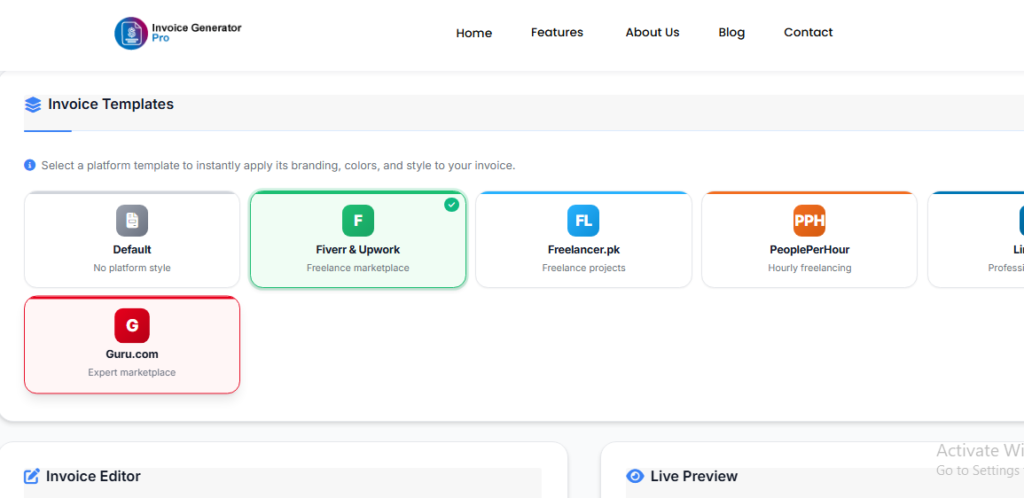
Invoice Generator Pro gives you a free, no-login invoice template built for exactly this, and you can have one ready in under two minutes. No account to create, no software to learn, just a clean PDF you can send right away.
Example:
A virtual assistant named Mariam used to send invoices as plain text in the Upwork chat box: just a total and a thank you. One client’s accounting team rejected it twice because it had no invoice number and no breakdown of hours. Once Mariam switched to a proper itemized invoice with a number, date, and hourly breakdown, the same client’s accounting team approved every invoice on the first try.
5. Add a late fee clause upfront
A small late fee clause, even just 1.5% per month, changes client behavior. People who know there’s a cost to paying late tend to pay on time. Put it in writing before the project starts, not after the due date passes.
You don’t need to enforce it every single time you’re a day or two late. The point isn’t to collect extra money. The point is that a client scanning your contract sees the clause and mentally moves your invoice up the priority list, ahead of bills with no consequence attached.
Example:
A freelance video editor named Daniel added a 2% monthly late fee line to his standard contract after one client paid him five weeks late on a $1,800 project with zero explanation. On his very next contract with a different client, that same client mentioned during onboarding that he’d “make sure accounting got it paid on time” after reading the late fee clause. Daniel never had to chase that invoice once.
While You Wait for Payment
6. Invoice immediately after delivering the work
Don’t let invoices sit in your drafts folder. Send the invoice the same day you deliver the final files. The longer you wait, the easier it is for the client to forget the details or lose the urgency, especially if they’re juggling multiple projects with multiple freelancers at once.
A two-day gap between delivery and invoicing rarely feels urgent to anyone. A same-day invoice keeps the work fresh in the client’s mind and ties the payment directly to the result they just received.
Example:
A freelance translator named Wei used to batch her invoicing once a month to “save time,” sending five invoices at once for work spread across four weeks. Clients kept asking which invoice matched which job, and two of them sat unpaid for over a month simply from confusion. Wei switched to invoicing the same day she delivered each job. Her clients stopped asking questions, and her average payment time dropped by more than a week.
7. Make the payment process easy
Clients pay faster when there’s nothing standing between them and the “pay” button. List your accepted payment methods clearly, and if you’re using Upwork’s built-in system, make sure your invoice matches the contract terms exactly. Mismatched numbers cause unnecessary delays.
Even a small mismatch, like your invoice saying $1,250 while the contract says $1,200 because you forgot to subtract a partial milestone, sends the whole thing back to review. That review can sit in a queue for days while you wonder why nothing’s happening.
Example:
A freelance bookkeeper named Lucia once sent an invoice that listed her rate per hour but forgot to multiply it by the actual hours logged, leaving the total blank. The client’s office manager emailed back asking for a corrected version, and the invoice sat untouched for six days while Lucia was traveling and slow to check email. She now double-checks every total against her time log before sending, every single time.
8. Build trust before you ask for money
Clients who trust you pay faster, plain and simple. Respond quickly, give status updates without being asked, and deliver what you promised. Trust removes hesitation, and hesitation is usually what turns a one-day delay into a three-week one.
Think about it from the client’s side for a second. If they’ve heard from you twice a week with real progress, an invoice from you feels routine. If they’ve heard nothing for a month and then get a bill, that invoice feels like a surprise, and surprises get put off.
Example:
Two freelance writers on Upwork, both charging similar rates, worked with similar clients last year. One sent weekly one-line updates: “Draft 1 done, sending for review Thursday.” The other only made contact at delivery and invoice time. The first writer got paid within 3 days on average. The second averaged closer to 12, and one client even asked her, mid-dispute, whether the work had actually been done.
9. Keep your invoice language calm and direct
Avoid sounding desperate or apologetic in your invoice notes. A line like “Payment due within 7 days. Thank you for your business” works better than a long, anxious paragraph. Confidence reads as professionalism, and professionalism gets paid faster.
Example:
A freelance illustrator named Beth used to write invoice notes like, “Hi! So sorry to bother you again, no rush at all, but if you get a chance, would you mind checking on this whenever you have a moment? Thanks so much, sorry again!” One client later told her, honestly, that her invoices read like she didn’t expect to be paid, so he never treated them as urgent. Beth rewrote her template to a flat: “Payment due 2026. Let me know if you have any questions.” Clients started paying within the stated window almost every time.
10. Track every invoice you send
Keep a simple log of who you’ve invoiced, when, and for how much. You’d be surprised how many freelancers lose track of unpaid invoices simply because they never wrote them down anywhere. A spreadsheet or your invoicing tool’s dashboard works fine for this.
Example:
A freelance photographer named Omar realized at tax season that he had three unpaid invoices from the previous year, totaling almost $1,400, that he’d simply forgotten to follow up on. He’d assumed they were paid because he never wrote them down anywhere to check. He now keeps a single spreadsheet tab listing every invoice, the due date, and a “paid” checkbox, and reviews it every Friday for five minutes.
When Payment Is Late
11. Send a polite reminder the day after the due date
Don’t wait a week to follow up. Send a short, friendly reminder the day after the due date passes. Something like: “Hi [Name], just checking in on invoice #1023, due yesterday. Let me know if you need anything from me to process it.” Most late payments are oversights, not refusals, and a one-day reminder catches most of them before they turn into anything bigger.
Waiting too long to send that first reminder is one of the most common mistakes freelancers make. A week of silence makes the eventual conversation harder than it needed to be.
Example:
A freelance SEO consultant named Farah used to wait two full weeks before sending any kind of reminder, worried it would come across as pushy. By the time she finally followed up, clients had often genuinely forgotten the work entirely and needed a recap before they’d even consider paying. She switched to a same-next-day reminder, worded gently, and most clients responded within hours, saying something like, “Oh, sorry, missed this, paying now.”
12. Escalate gradually, not aggressively
If the first reminder gets no response, send a second one after 3 to 5 days with a firmer tone. Reference the original due date and the late fee clause if you have one. Save the strongest language for last, after every polite option has been tried.
A useful rule of thumb: reminder one is a question, reminder two is a statement, reminder three is a deadline. Each step should be a little more direct than the one before it, without skipping straight to a threat on day one.
Example:
A freelance app developer named Rafael once jumped straight from a polite first reminder to an angry message accusing a client of “stealing his work” after just four days of silence. The client, who turned out to be dealing with a family emergency, ended the contract entirely and left a negative review. Rafael now uses a fixed sequence: friendly nudge on day one, firmer note on day five referencing the due date, and a clear final notice on day ten before mentioning any dispute process.
13. Use Upwork’s dispute process when needed
If a client on Upwork refuses to release a milestone payment for completed work, Upwork has a formal dispute process for exactly this situation. It’s not something to use for every minor delay, but it exists, and clients usually know it exists too, which speeds things up on its own.
Mention it calmly, not as a threat. Something like, “If we can’t resolve this by Friday, I’ll need to open an Upwork dispute on the milestone,” is firm without being hostile. Most clients respond before it ever needs to go that far.
Example:
A freelance copywriter named Joon delivered a completed sales page, and the client refused to release the milestone, claiming the work “wasn’t what he imagined” despite it matching every brief detail exactly. After two unanswered messages, Joon sent one calm note mentioning he’d open a formal dispute if there was no response within three business days. The client released the payment the next morning, no further explanation given.
14. Pause new work until the invoice is settled
If a client is overdue and unresponsive, it’s reasonable to pause additional work until the outstanding invoice is paid. This isn’t about punishing the client. It’s about protecting your time from going further unpaid, since every hour you spend on new tasks while an old invoice sits open is an hour you’re financing for free.
Tell the client directly: “I’ll pick this back up as soon as invoice #1023 is settled.” Clear and calm, no drama attached.
Example:
A freelance social media manager named Anita kept posting content for a client for three weeks past an unpaid invoice, hoping he’d “catch up eventually” since he was a long-term account. He never did, and by the time she stopped working, she’d done three additional weeks of unpaid labor on top of the original unpaid invoice. On her next client relationship, she built a simple rule into her process: no new content goes live until the previous invoice clears.
15. Keep a paper trail on everything
Save your contracts, your invoices, your messages, and your payment confirmations. If a payment dispute ever needs Upwork’s involvement, a clear paper trail makes your case for you. Clients also tend to pay faster once they realize you’re organized enough to escalate if needed, because disorganized freelancers are easier to stall.
A simple folder system by client name, with subfolders for contracts and invoices, takes ten minutes to set up and saves hours of scrambling later.
Example:
A freelance consultant named Greg had a client dispute a $2,200 invoice eight months after the work was delivered, claiming the project was never finished. Because Greg had saved every message, the original contract, and the client’s own approval message for the final deliverable, Upwork resolved the dispute in his favor within two days. Without that paper trail, he likely would have lost the payment entirely just from not being able to prove what had actually happened.
Make This Easier on Yourself
You don’t need to build invoices from scratch every time, and you definitely don’t need spreadsheets full of broken formulas. Invoice Generator Pro lets you create a professional invoice in your browser, with no login and no cost, in about two minutes. Add your line items, set your due date, and send a clean PDF that gives clients zero excuse to delay.
Create your free invoice now at Invoice Generator Pro →
If you’re specifically juggling milestone payments and fixed-price contracts on Upwork, the standard template might not be enough. Our Upwork Invoice Generator matches Upwork’s contract structure directly, so your invoice numbers, milestones, and totals line up exactly with what the client sees on their end. No mismatched figures, no confusion, no excuse for a delayed payment.
Try the free Upwork Invoice Generator →
Common Questions About Upwork Invoicing
How long does Upwork take to release escrow payment?
Once a client approves a milestone, funds usually clear into your Upwork balance within a few days, and from there into your bank account based on your withdrawal method. Delays almost always come from the client not approving the milestone, not from Upwork itself.
What’s the best payment term for a new Upwork client?
Due on receipt of a 50% deposit upfront. Save net 15 and net 30 terms for clients you’ve already worked with and trust to pay on schedule.
Should freelancers charge late fees on Upwork?
You can, but it needs to be in your contract terms before the project starts. Adding a late fee after the due date has already passed usually causes more friction than it solves.
What should I do if a client just stops responding after the invoice?
Send two reminders spaced a few days apart. If there’s still no response after that, reference the Upwork dispute process directly. Silence after a clear, polite reminder is usually the point where you stop being patient and start being formal.
Finale Thought
Getting paid faster on Upwork isn’t about being pushy or chasing clients down. It’s about removing the small frictions that cause delays in the first place: unclear terms, messy invoices, slow follow-ups, and disorganized records. Fix those, and most of your late payment problems disappear before they start.

Akbar Ali is the Founder of InvoiceGeneratorPro.io, a platform dedicated to helping freelancers, small businesses, startups, agencies, and entrepreneurs create professional invoices quickly and efficiently. With years of experience in digital business, SEO content strategy, and online entrepreneurship, he focuses on developing practical tools and educational resources that simplify invoicing, payment management, and financial documentation.As a business writer and digital entrepreneur, Akbar creates in-depth guides, industry insights, and actionable content covering invoicing, freelancing, accounting basics, business finance, taxation, productivity, and payment solutions. His goal is to make complex financial processes easy to understand while helping professionals save time and present their businesses more professionally.Through InvoiceGeneratorPro.io, he continues to build reliable, user-friendly solutions that empower businesses worldwide to streamline their billing workflows and improve financial organization.
Akbar Ali