You send an invoice, check your email a few minutes later, and see a message from your client:
“We can’t approve this invoice.”
That sentence can be frustrating, especially when you’ve already completed the work and expected payment to be the easy part.
Before assuming the client doesn’t want to pay, check the invoice itself. A rejected invoice often has a specific problem that an accounting or procurement team cannot ignore. The client may have the wrong billing address, a missing purchase order number, an incorrect amount, a tax error, or a line item that doesn’t match the original agreement.
For freelancers and small businesses, these mistakes can cause more than an annoying email exchange. They can delay payment, create cash flow problems, and add extra work for both sides.
The good news is that most invoice rejection reasons are easy to identify once you know what to check.
Here are 12 common reasons clients reject invoices, followed by practical steps you can take to fix the problem.
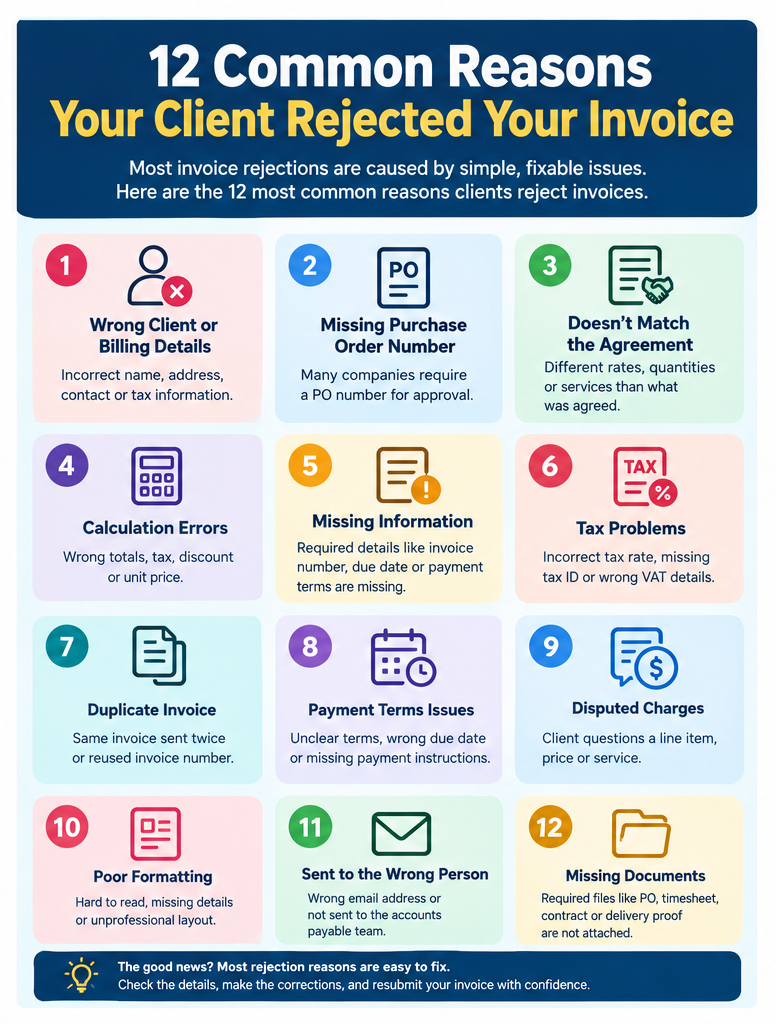
Let’s look at each one.
1. The client or billing information is incorrect
One of the simplest invoice problems can also cause a complete rejection.
If the client’s legal business name, billing address, tax ID, contact details, or other required information is wrong, their accounting team may send the invoice back.
For example, you might work with a company called Greenway Design, but its legal billing entity could be Greenway Design LLC. If you put the wrong company name on the invoice, the accounting system may not match it with the customer’s records.
The same problem can happen with a wrong billing address or incorrect email address.
Before sending an invoice, check:
- Client’s legal business name
- Billing address
- Contact person’s name
- Billing email
- Tax ID, when required
- Your own business information
- Invoice number
- Invoice date
A small spelling mistake can create an invoice mismatch.
How to fix it
Create a corrected invoice with the exact information supplied by the client. If your client has a vendor onboarding form or billing instruction document, use those details rather than relying on memory.
2. The purchase order number is missing
Some companies require a purchase order (PO) number before their accounts payable team can approve an invoice.
You may have completed the work correctly and charged the agreed amount, but the invoice can still be rejected if the required PO number isn’t included.
For example, a company might give you PO #45872 when approving a project. Their accounting department then expects your invoice to reference that number.
Without it, the invoice may not match the purchase order in their system. This is one reason an invoice can be rejected even when the amount itself is correct.
How to fix it
Ask the client whether a PO number is required before submitting the invoice. If they provide one, add the correct number to the invoice and resubmit it according to their billing instructions. Don’t guess a PO number. One incorrect number can create another rejection.
3. The invoice doesn’t match the agreement
Your invoice should reflect what you and your client agreed to.
Problems occur when the invoice contains a different hourly rate, project fee, quantity, service description, or delivery charge.
Suppose you agreed to charge $1,500 for a website project. You later send an invoice for $1,750 because you added extra work. If the client didn’t approve that additional work, they may dispute the invoice amount.
The same thing happens with hourly projects.
You may invoice 30 hours while the client approved 25 hours. The difference needs an explanation and, in some cases, prior approval.
How to fix it
Compare the invoice with the:
- Contract
- Proposal
- Quote
- Purchase order
- Approved timesheet
- Email confirmation
- Change order
If the invoice contains work outside the original agreement, explain it clearly and provide evidence of the client’s approval.
4. The invoice contains calculation errors
Invoice calculation errors are another common reason for rejection. A simple mistake in quantity, unit price, subtotal, tax, discount, or total amount can make the invoice inaccurate.
For example:
| Item | Quantity | Unit Price | Correct Total |
|---|---|---|---|
| Design service | 4 | $250 | $1,000 |
| Copywriting | 2 | $150 | $300 |
| Subtotal | $1,300 |
If your invoice accidentally shows a subtotal of $1,350, the client may reject it even if the difference is small. Check every number before sending.
Look at:
- Quantity
- Unit price
- Discounts
- Subtotal
- Tax
- Shipping or other charges
- Final invoice total
Manual calculations become especially risky when an invoice contains many line items.
How to fix it
Correct the calculation and issue a revised invoice. Make sure the revised invoice has a clear invoice number or revision reference so the client knows which document to process.
5. Required invoice information is missing
Every client has different invoice requirements.
Some companies may need your business registration information, tax details, bank information, payment instructions, PO number, project reference, or specific contact information.
A freelancer might send an invoice containing only:
Website design: $1,000.
That may be enough for a small client, but a larger company’s accounts payable department could require much more information.
A professional invoice usually includes details such as:
- Your business name
- Client’s business name
- Invoice number
- Invoice date
- Description of products or services
- Quantity
- Price
- Subtotal
- Taxes, where applicable
- Total amount due
- Due date
- Payment terms
- Payment instructions
The exact requirements depend on the business, contract, and jurisdiction.
How to fix it
Ask the client for its invoice requirements before submitting another invoice. Keep those requirements somewhere accessible so you don’t have to ask the same question for every billing cycle.
6. Tax information is incorrect
Tax errors can stop an invoice from being approved.
The problem could be an incorrect tax rate, missing tax ID, wrong VAT information, or tax being applied when the agreement or applicable rules don’t call for it.
For example, if your invoice applies the wrong sales tax rate, the client’s accounting team may reject the invoice and ask for a corrected document.
Tax rules vary by location and transaction type, so don’t copy tax details from an old invoice without checking that they still apply.
How to fix it
Review the tax amount and the information required for your transaction. If you’re unsure about a tax treatment, ask a qualified accountant or tax professional rather than guessing.
For international invoices, pay close attention to the client’s country, currency, tax identification details, and any documentation required for the transaction.
7. The invoice is a duplicate
A duplicate invoice can happen more easily than you’d expect. You might send an invoice by email and then submit the same invoice through a client portal. The client could receive both copies and flag one as duplicate.
It can also happen when you forget which invoice number you already used.
For example, invoice #1045 might already have been submitted. You accidentally send another document using the same number for the same project. The accounting system may reject the second submission.
How to fix it
Check your invoice records before creating a new invoice. Use a consistent numbering system, such as:
- INV-2026-001
- INV-2026-002
- INV-2026-003
Don’t reuse invoice numbers for unrelated invoices.
If you’ve accidentally submitted the same invoice twice, tell the client which copy should be processed.
8. Payment terms are unclear or incorrect
Payment terms tell the client when and how you expect payment.
If your invoice says “Payment due soon”, the client may not know what that means.
Clear terms could say: Payment due within 30 days of invoice date.
You should also make payment instructions easy to find. Depending on your business, you might include:
- Bank transfer details
- Online payment option
- Payment link
- Accepted payment methods
- Due date
- Currency
Unclear payment instructions can cause unnecessary back-and-forth.
How to fix it
Review the payment terms agreed with the client and put them clearly on the invoice. If the contract says Net 30, your invoice should reflect that agreement. Don’t introduce different payment terms on the invoice without discussing the change with the client.
9. The client disputes a charge or line item
Sometimes the client isn’t questioning the entire invoice. They’re questioning one part of it.
A client may dispute:
- An hourly charge
- A quantity
- A service fee
- A delivery charge
- A revision fee
- An additional service
- An expense
- A project change
For example, a client may say,
“We approved 10 hours, but this invoice shows 14.”
That’s an invoice dispute, and sending the same invoice again won’t solve it.
How to fix it
Find the exact disputed line item. Then compare it with the relevant evidence, such as the contract, timesheet, approved quote, email, or project records.
If you made an error, correct it. If the charge is valid, explain the charge clearly and provide the supporting information. Keep the conversation professional. The goal is to establish what was agreed and what was delivered.
10. The invoice is poorly formatted
A client doesn’t need an artistic masterpiece. They do need an invoice that is easy to read.
A poorly formatted invoice can make basic information difficult to find. If the invoice number, total amount, due date, or line items are buried in a confusing layout, the client’s accounting team has more work to do.
A professional invoice should make these details easy to identify:
Who is billing?
Who is being billed?
What was purchased?
How much is due?
When is payment due?
How should the client pay?
Avoid tiny text, overcrowded tables, inconsistent spacing, and unnecessary design elements.
How to fix it
Use a clean professional invoice format with clear sections and readable line items. An online invoice maker or invoice generator can also reduce formatting mistakes by using a consistent structure each time.
11. The invoice was sent to the wrong person or department
You can have a perfectly accurate invoice and still experience a delay if it goes to the wrong email address.
Some companies require invoices to go directly to:
- Accounts payable
- Finance
- Procurement
- A vendor portal
- A specific billing contact
Sending an invoice only to the project manager may not be enough.
The project manager may approve your work but have no responsibility for processing payments.
How to fix it
Ask the client:
Could you confirm the correct email address or portal for invoice submissions?
Then follow that process. If the client uses an online vendor system, submit the invoice there even if you’ve previously emailed it to your main contact.
12. Supporting documents are missing
Some invoices require documents that prove the work, delivery, or expense.
Examples include:
- Approved timesheets
- Delivery receipts
- Purchase orders
- Expense receipts
- Contracts
- Work completion records
- Project approval documents
- Shipping documents
For instance, a client may require a signed timesheet with every freelance invoice. If you send the invoice without the timesheet, the invoice may be rejected until the missing document arrives.
How to fix it
Ask the client which documents are required and attach them when you resubmit the invoice. Don’t send random documents hoping one of them satisfies the requirement. Confirm what the client needs.
What should you do after a client rejects your invoice?
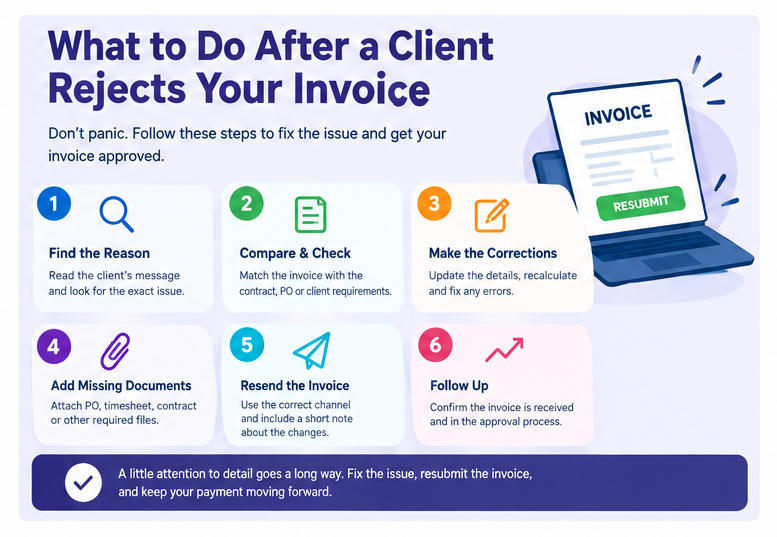
First, don’t immediately assume the client is refusing to pay. Read the rejection message carefully.
Look for a specific reason such as:
Missing PO number
Incorrect billing address
Amount doesn’t match purchase order
Please attach timesheet
Tax information required
Once you know the reason, compare the invoice with the client’s instructions and your original agreement. Then correct the specific issue.
If the client hasn’t explained the rejection, send a short message asking what needs to be changed.
For example:
“Thanks for letting me know. Could you please confirm which invoice details need to be corrected before I resubmit it?”
That gives the client a simple way to answer.
How to correct a rejected invoice
Don’t create confusion by sending several versions of the same invoice with no explanation. Follow a simple process:
- Identify the rejection reason.
- Check the original invoice.
- Compare it with the contract or purchase order.
- Correct the inaccurate information.
- Recalculate the totals.
- Check tax information.
- Attach required documents.
- Confirm the correct submission method.
- Resend the corrected invoice.
- Tell the client what was changed.
- If you changed the amount, line items, or tax, make that clear.
For example:
“I corrected the billing address and updated the invoice total to match PO #45872. The revised invoice is attached.”
Short and specific is better than a long explanation.
How to prevent invoice rejection before sending
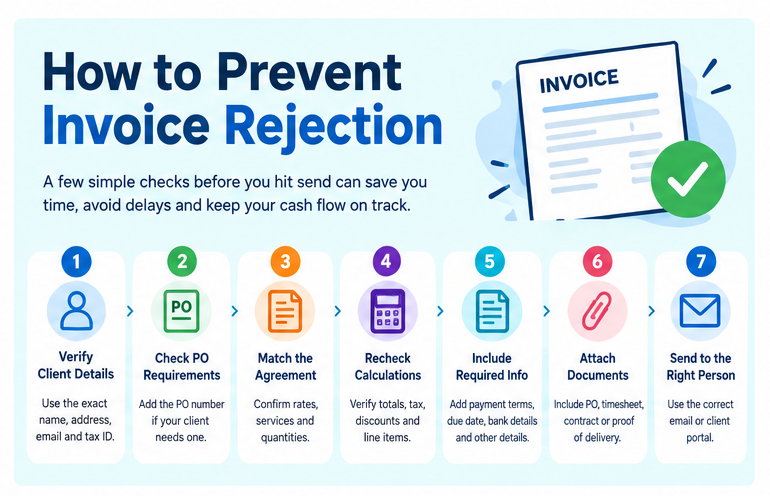
The easiest invoice problem to fix is the one you catch before the client sees it. Before sending any invoice, run through this checklist.
Client details
- Correct legal business name
- Correct billing address
- Correct contact
- Correct email address
- Tax ID, if required
Invoice details
- Unique invoice number
- Correct invoice date
- Correct due date
- Correct currency
- Clear service descriptions
- Correct quantities
- Correct prices
- Correct subtotal
- Correct taxes
- Correct final total
Client requirements
- PO number included
- Project reference included
- Required payment terms included
- Required supporting documents attached
- Correct submission portal or email used
Payment
- Payment method is clear
- Bank details are correct
- Payment link works, if used
- Currency is stated
- Due date is easy to find
This takes a few minutes.
A rejected invoice can take much longer to fix.
Why accurate invoices matter for cash flow
For a freelancer or small business, an invoice isn’t complete when you press Send. Payment still needs to move through the client’s approval process.
If an invoice is rejected, the payment clock may effectively get pushed back while the problem is corrected. Imagine you send a $2,000 invoice under Net 30 terms. The client rejects it because the PO number is missing. You correct the invoice several days later.
Depending on the client’s accounts payable process, that delay may affect when the payment gets approved and scheduled. For a business with several outstanding invoices, repeated delays can create a serious cash flow problem. That’s why accurate billing deserves attention before the invoice leaves your hands.
Can an invoice generator prevent rejection?
An invoice generator can reduce some common manual errors, especially calculation and formatting mistakes.
A good invoice generator can give you structured fields for:
- Client information
- Invoice number
- Dates
- Line items
- Quantities
- Prices
- Taxes
- Discounts
- Payment terms
- Notes
- Payment information
It won’t know whether your client requires a specific PO number or whether an extra project charge was approved. You still need to check the client’s requirements.
But using a consistent invoice creation process can make it easier to catch missing or incorrect information before submission.
For freelancers and small businesses that create invoices regularly, an online invoice maker can also save time compared with rebuilding an invoice manually.
A 60-second invoice check before you click Send
Here’s a simple final check.
1. Who is paying?
Confirm the client’s legal name and billing information.
2. What are they paying for?
Read every line item.
3. Does the amount match the agreement?
Check your quote, contract, or PO.
4. Are the calculations correct?
Recheck subtotal, tax, discount, and total.
5. Is anything missing?
Check PO numbers, tax information, supporting documents, and payment details.
6. Did you send it to the right place?
Confirm the client’s billing email or portal.
7. Can the client understand what to do next?
The amount, due date, and payment instructions should be obvious.
That final check can prevent a surprising number of invoice problems.
Frequently Asked Questions
1. Why do clients reject invoices?
Clients commonly reject invoices because of incorrect billing information, missing PO numbers, calculation errors, tax problems, duplicate invoices, disputed charges, incorrect payment terms, or missing documents.
2. What should I do if my client rejects my invoice?
Find out the exact rejection reason, correct the invoice, check it against the client’s requirements, and resubmit it through the required channel.
3. How do I fix a rejected invoice?
Correct the specific error identified by the client. Recheck the invoice number, client details, line items, calculations, taxes, payment terms, and required documents before resubmitting it.
4. Can a client refuse to pay an invoice?
A client may dispute an invoice or refuse payment when they believe the amount is incorrect, the work wasn’t agreed upon, required conditions weren’t met, or the invoice doesn’t meet their billing requirements. Your contract and applicable law determine your rights.
5. Why would accounts payable reject an invoice?
Accounts payable may reject an invoice because it doesn’t match a purchase order, contains incorrect information, lacks required documentation, uses the wrong submission method, or doesn’t meet the company’s invoice requirements.
6. Why does an invoice need a purchase order number?
A PO number lets a company match an invoice with an approved purchase order. Some businesses require it before accounts payable can process payment.
7. What information should be included on an invoice?
Common details include the seller’s information, client’s information, invoice number, invoice date, description of products or services, quantities, prices, taxes when applicable, total amount, due date, payment terms, and payment instructions.
8. How can I prevent invoice rejection?
Check the client’s billing requirements before sending the invoice. Verify names, addresses, PO numbers, line items, calculations, taxes, payment terms, supporting documents, and the submission method.
9. What is an invoice dispute?
An invoice dispute happens when a client questions some part of the invoice, such as the amount, quantity, price, service, expense, or other charge.
10. How do I handle a disputed invoice?
Identify the exact disputed item and compare it with the contract, quote, PO, timesheet, or other records. Correct the invoice if you’ve made an error. If the charge is valid, explain it and provide supporting evidence.
11. Can incorrect billing information cause invoice rejection?
Yes. A wrong business name, billing address, tax ID, contact, or other required detail can prevent an invoice from matching the client’s records.
12. Can a missing PO number delay payment?
Yes. If the client’s process requires a PO number, the invoice may be returned until the correct PO information is added.
13. Should I create a new invoice after rejection?
It depends on the client’s process. If only a minor detail needs correction, the client may ask for a revised invoice. Follow the client’s instructions rather than creating multiple invoice records unnecessarily.
14. How do I ask a client why they rejected my invoice?
Keep the message short and professional. Ask the client to identify the information that needs to be corrected before you resubmit the invoice.
15. Can poor invoice formatting cause rejection?
It can contribute to processing problems, particularly when important information is difficult to find or the invoice doesn’t follow a client’s required format.
16. What happens when an invoice doesn’t match a purchase order?
The client may reject or hold the invoice until the differences are resolved. Check quantities, prices, services, and other details against the purchase order.
17. Can missing tax information cause invoice rejection?
Yes. If a client requires specific tax information and it is missing or incorrect, the invoice may need to be corrected before payment can be processed.
18. How long should I wait after correcting a rejected invoice?
Resubmit it according to the client’s stated process. If the client doesn’t provide a timeline, confirm when the corrected invoice has entered their approval process.
19. Can duplicate invoices cause payment problems?
Yes. A duplicate invoice can be flagged by an accounting system or accounts payable team. Use unique invoice numbers and maintain accurate invoice records.
20. How can I make invoices easier for clients to approve?
Use accurate client information, clear line items, correct calculations, agreed payment terms, required PO numbers, supporting documents, and the client’s preferred submission method.
Last Message
A rejected invoice doesn’t always mean there’s a serious problem with the client relationship. Often, the issue is much more practical: a missing PO number, incorrect address, calculation mistake, disputed line item, missing document, or invoice that doesn’t match the client’s records.
The best approach is simple. Find the exact rejection reason, correct it, and resubmit the invoice properly.
Before sending your next invoice, take one minute to check the client details, invoice number, line items, totals, taxes, payment terms, PO number, supporting documents, and submission method.
That small check can prevent a long email thread later.
And when you create invoices regularly, using a consistent invoice format or an online invoice generator can make those checks much easier.

Akbar Ali is the Founder of InvoiceGeneratorPro.io, a platform dedicated to helping freelancers, small businesses, startups, agencies, and entrepreneurs create professional invoices quickly and efficiently. With years of experience in digital business, SEO content strategy, and online entrepreneurship, he focuses on developing practical tools and educational resources that simplify invoicing, payment management, and financial documentation.As a business writer and digital entrepreneur, Akbar creates in-depth guides, industry insights, and actionable content covering invoicing, freelancing, accounting basics, business finance, taxation, productivity, and payment solutions. His goal is to make complex financial processes easy to understand while helping professionals save time and present their businesses more professionally.Through InvoiceGeneratorPro.io, he continues to build reliable, user-friendly solutions that empower businesses worldwide to streamline their billing workflows and improve financial organization.
Akbar Ali