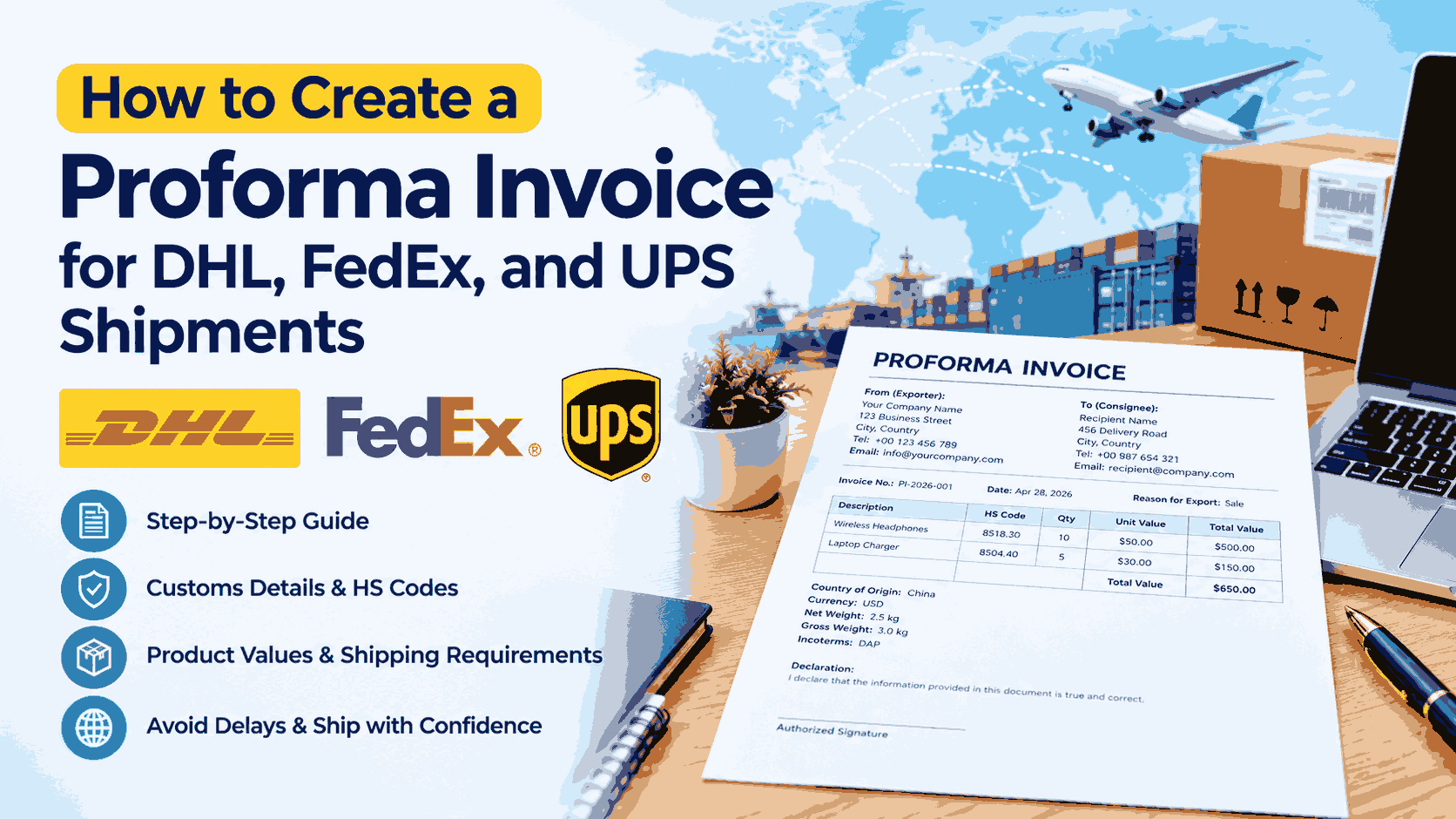
Sending a package across a border sounds simple until customs asks for an invoice, HS code, product value, country of origin, and a few details you didn’t expect to provide.
For a business owner, freelancer, online seller, or exporter, these small paperwork errors can turn into shipping delays. A missing product description or unclear declared value may cause the courier or customs authority to ask for more information before the shipment can move.
A proforma invoice for international shipping gives the buyer, seller, courier, and customs authorities a clear record of what is being shipped and how the shipment should be handled.
If you regularly create invoices, you can also prepare one online with Invoice Generator Pro. It gives you a simple way to create professional invoice documents without building each document from scratch.
The exact document required depends on the type of shipment and destination. DHL, FedEx, UPS, and local customs authorities may have their own requirements, so check the courier’s current instructions before shipping.
What Is a Proforma Invoice for International Shipping?
A proforma invoice is a preliminary document that describes a proposed transaction. It can include the seller and buyer details, goods description, quantity, value, currency, shipping terms, and reason for export.
Businesses commonly use proforma invoices when the shipment does not represent a standard completed sale, or when the buyer needs the shipment details before the final commercial transaction is completed.
For example, a company may send:
- Product samples
- Goods for evaluation
- Items for repair
- Warranty replacements
- Returned merchandise
- Temporary exports
- Certain non-commercial shipments
- Goods being transferred between related companies
A proforma invoice can also give the recipient an early view of the expected shipment value and contents.
The important part is accuracy. A courier needs enough information to process the shipment, while customs authorities need enough information to classify the goods and determine applicable duties or taxes.
DHL’s current customs guidance asks for complete and accurate commercial or proforma invoice data, including shipment parties, goods descriptions, HS codes, country of origin, values, quantity, weight, and other customs information.
Proforma Invoice vs. Commercial Invoice
These two documents are often confused.
A proforma invoice is generally prepared before a completed sale or for certain special shipment situations. A commercial invoice records the actual commercial transaction and is commonly used for customs clearance when goods have commercial value.
The distinction matters.
DHL’s current U.S. guidance states that a commercial invoice is required for international shipments of goods with commercial value, while a proforma invoice can be used for certain transactions such as goods that are not intended for resale, returned merchandise, or temporary imports.
So, don’t automatically create a proforma invoice simply because you’re shipping internationally.
Check the courier and destination country’s requirements first.
For example, if you’re exporting products that a customer has purchased, the shipment may require a commercial invoice. If you’re sending samples or certain goods temporarily, a proforma invoice may be appropriate.
What Information Should a Proforma Invoice Include?
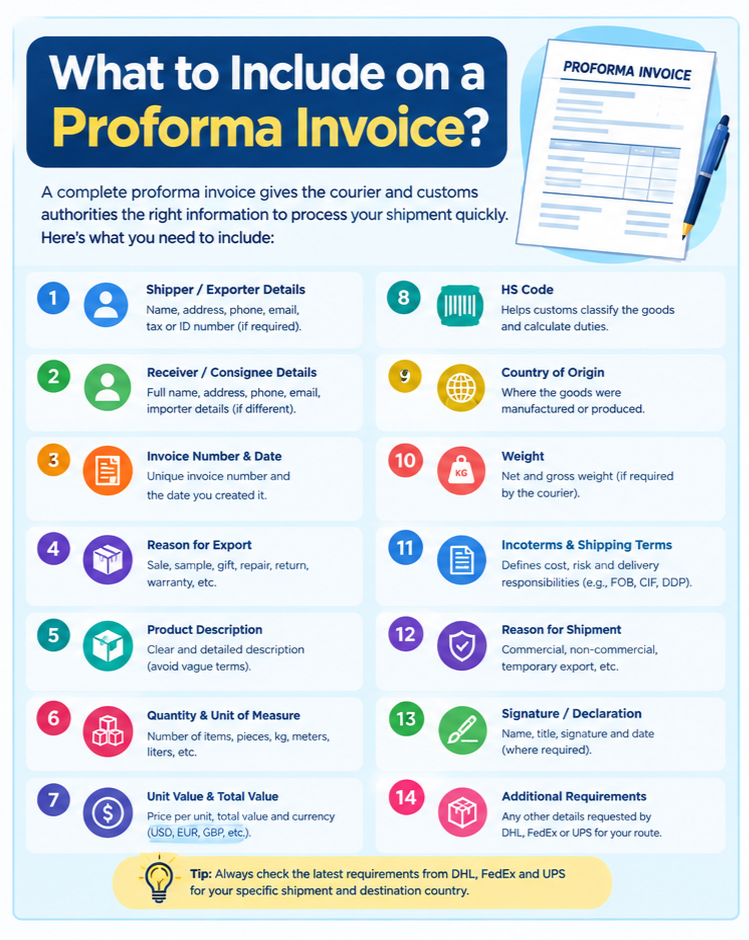
A good shipping proforma invoice should contain enough information for someone unfamiliar with the shipment to understand exactly what is being sent.
1. Shipper or Exporter Details
Start with the sender’s information. Include:
- Full name or company name
- Complete address
- City and postal code
- Country
- Phone number
- Email address
- Tax or identification number when required
For business shipments, use the legal business information that matches your shipping records.
2. Receiver or Consignee Details
The consignee is the person or business receiving the goods. Include:
- Full name
- Company name, if applicable
- Complete delivery address
- City
- Postal code
- Country
- Phone number
- Email address
If the importer of record is different from the receiver, additional importer information may be required.
DHL’s customs guidelines specifically ask for full shipper/exporter and receiver/importer details, including contact information.
3. Proforma Invoice Number
Give the document a unique number.
For example:
PI-2026-00125
A consistent numbering system makes it easier to match the document with your shipment records.
If you’re exporting from Pakistan, pay particular attention to the courier’s local requirements. DHL Pakistan’s current shipment preparation guidance states that an invoice number is mandatory for export from Pakistan.
4. Invoice Date
Add the date when you created the document.
Use a clear format such as:
September 11, 2026
or the date format requested by your courier or destination.
5. Reason for Export
This field can matter during customs processing.
Examples include:
- Sale
- Gift
- Sample
- Repair
- Return
- Warranty replacement
- Temporary export
- Personal use
- Intercompany transfer
Don’t choose a reason simply because it sounds convenient. It should match the actual purpose of the shipment.
6. Detailed Product Description
This is one of the most important parts of a customs proforma invoice.
Avoid descriptions such as:
- Samples
- Parts
- Goods
- Electronics
- Clothing
- Accessories
Those descriptions tell customs very little.
Instead, describe the actual product.
For example:
Men’s knitted cotton sweater, 80% cotton and 20% acrylic, for retail sale
That gives customs more information about what the item is, what it is made from, and how it will be used.
DHL specifically advises shippers to use clear, precise descriptions rather than vague terms.
7. Quantity and Unit of Measure
State how many units you’re shipping.
For example:
| Description | Quantity | Unit |
|---|---|---|
| Cotton T-shirts | 20 | Pieces |
| Product brochures | 50 | Pieces |
Use a unit that makes sense for the goods, such as pieces, kilograms, meters, or liters.
8. Unit Value and Total Value
List the value of each item and calculate the total.
Example:
| Product | Qty | Unit Value | Total |
|---|---|---|---|
| Cotton T-shirt | 10 | $15 | $150 |
| Sample packaging | 5 | $2 | $10 |
Total goods value: $160
Never deliberately undervalue goods to reduce customs charges. Incorrect valuation can create customs problems and penalties.
9. Currency
Clearly state the currency.
Examples:
- USD
- EUR
- GBP
- CAD
- AED
- PKR
A figure without a currency can create confusion.
10. Country of Origin
Country of origin means where the goods were manufactured or produced.
For example:
Country of Origin: Pakistan
If you’re selling an item manufactured in another country, use the correct origin rather than automatically using your own country.
11. HS Code
The Harmonized System code, usually called an HS code, helps customs classify the goods.
Different products have different classifications.
For example, clothing, electronics, machinery, cosmetics, and food products can have different commodity codes.
Don’t guess an HS code simply because another seller used it. Check the appropriate customs tariff, courier guidance, or qualified customs source for your product.
DHL’s current guidance identifies HS or commodity codes as an important part of international customs documentation.
12. Weight
Depending on the courier and shipment, you may need:
- Net weight
- Gross weight
- Unit weight
- Total shipment weight
Make sure your invoice information is consistent with the shipment and packing documents.
13. Incoterms and Shipping Terms
For commercial shipments, the applicable Incoterms can define which party handles certain costs, risks, insurance, and delivery responsibilities.
Examples include:
- EXW
- FCA
- FOB
- CIF
- DAP
- DDP
Don’t choose an Incoterm simply because it appears familiar. Use the term agreed between the buyer and seller and make sure it fits the transaction.
14. Signature and Declaration
Depending on the document and courier requirements, you may need a declaration, signature, name, job title, and date.
Review the courier’s current requirements before printing the final document.
How to Create a Proforma Invoice Step by Step
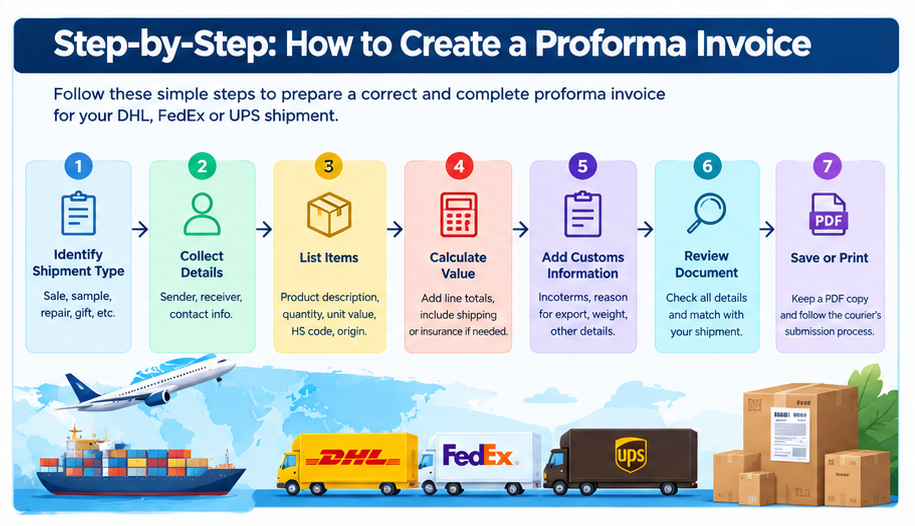
Once you know the required information, creating the document is straightforward.
Step 1: Identify the Shipment Type
First determine why you’re shipping the goods.
Is it a sale?
A sample?
A repair?
A return?
A gift?
A temporary export?
This affects which shipping documentation may be required.
Step 2: Collect the Sender and Receiver Information
Have the full names, addresses, phone numbers, email addresses, and any required tax or identification numbers ready.
Small errors here can create problems when the courier needs to contact the receiver.
Step 3: List Every Item
Create one line for each product.
Include:
- Product description
- Quantity
- Unit
- Unit value
- Total value
- HS code
- Country of origin
- Weight where required
Avoid combining unrelated products under one vague description.
Step 4: Calculate the Shipment Value
Add the line-item totals.
For example:
10 × $20 = $200
5 × $15 = $75
Total goods value = $275
If shipping, insurance, or other charges need to be declared separately, enter them according to the courier’s instructions.
Step 5: Add Customs Information
Add the HS codes, country of origin, reason for export, Incoterms when applicable, and other required customs information.
Step 6: Review the Document
Check:
- Names
- Addresses
- Product descriptions
- Quantity
- Currency
- Unit values
- Total value
- HS codes
- Country of origin
- Weight
- Reason for export
- Invoice number
- Date
Then compare the invoice with your actual package.
The information should match.
Step 7: Save or Print the Document
Save a PDF copy for your records.
Follow the courier’s instructions for attaching, uploading, or presenting the invoice with the shipment.
How to Create a Proforma Invoice for DHL
DHL uses customs invoice information when processing international shipments. Its current guidance says accurate commercial or proforma invoice data is needed for customs clearance.
If you’re using DHL Express, you may be able to create the required invoice information during shipment booking through MyDHL+, depending on your shipment and location.
DHL’s current Pakistan guide says users preparing package shipments can create an invoice using a DHL invoice template or use their own invoice. It also states that the invoice must correspond with the shipment contents and Air Waybill.
DHL Proforma Invoice Checklist
Before sending a DHL international shipment, check that your document includes the required information for your shipment:
- Shipper details
- Receiver details
- Invoice number
- Shipment details
- Product description
- Quantity
- Value
- Currency
- HS code
- Country of origin
- Weight
- Reason for export
- Applicable shipping terms
- Required identification numbers
DHL also advises that customs descriptions should be specific. A description such as “women’s cotton T-shirt” gives customs much more information than simply writing “clothes.”
Example DHL Shipment
Suppose a freelancer in Pakistan sends three product samples to a customer in Germany.
The invoice could contain:
Reason for export: Product samples
Item: Cotton women’s T-shirt samples
Quantity: 3 pieces
Country of origin: Pakistan
Declared value: USD 45
HS code: Appropriate code for the product
The exact classification and documentation requirements depend on the goods and destination.
How to Create a Proforma Invoice for FedEx
FedEx international shipments also require accurate customs information.
When preparing a FedEx proforma invoice, start with the same basic shipment information:
- Sender information
- Receiver information
- Shipment reason
- Product description
- Quantity
- Unit value
- Total value
- Currency
- Country of origin
- HS code
- Weight
- Applicable customs information
The courier may provide its own shipping or customs documentation workflow, so check the current FedEx instructions for your origin and destination.
FedEx Product Description Example
Suppose you’re sending two replacement laptop chargers.
A weak description would be:
Computer parts
A better description would be:
Replacement AC power adapter for laptop, 65W, for warranty replacement
The second description gives customs more information about what the product is and why it is being shipped.
FedEx Proforma Invoice Tips
Keep the information consistent across your:
- Proforma or commercial invoice
- Air Waybill
- Packing list
- Shipment booking
- Customs declaration
- If the invoice says five items but the package contains four, someone may need to investigate the discrepancy.
How to Create a Proforma Invoice for UPS
UPS international shipments also require accurate customs information.
When preparing a UPS proforma invoice, collect the shipment information before you start creating the document.
Include the:
- Exporter’s details
- Importer’s details
- Product descriptions
- Quantity
- Unit value
- Total value
- Currency
- Country of origin
- HS code
- Weight
- Reason for export
- Applicable trade terms
UPS may provide its own forms or electronic customs documentation during the shipping process. Use the current UPS instructions for your specific origin and destination.
UPS Example
A small software company sends a replacement computer component to a client overseas under warranty.
The shipment could state:
Reason for export: Warranty replacement
Description: Replacement laptop motherboard for warranty service
Quantity: 1
Country of origin: United States
Declared value: USD 120
HS code: Appropriate classification for the component
The description should match the actual item inside the package.
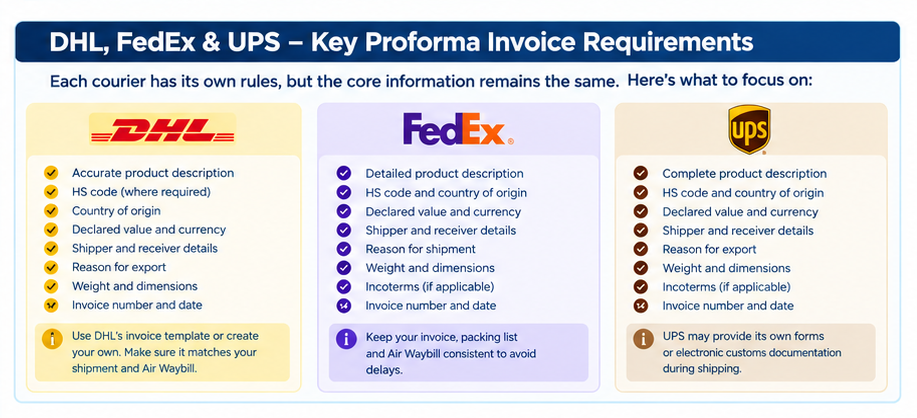
What Is the Difference Between a Proforma Invoice and a Customs Invoice?
The terminology can get confusing because different couriers and countries use slightly different terms.
A commercial invoice is generally tied to an actual commercial transaction.
A proforma invoice is generally a preliminary document or is used for certain transactions where a normal commercial invoice may not apply.
A customs invoice refers to documentation used to provide customs with information about the shipment. Depending on the courier and shipment, this may be a commercial invoice or a proforma invoice.
DHL’s current documentation makes an important distinction: a proforma invoice may be acceptable for certain types of transactions, while a commercial invoice is required for many shipments involving commercial value.
So before creating your document, identify the transaction type and check the courier’s requirements.
Common Proforma Invoice Mistakes That Cause Shipping Delays
A good document doesn’t need to be complicated. It needs to be accurate.
Here are some of the mistakes worth checking before you hand the package to DHL, FedEx, or UPS.
Vague Product Descriptions:
Writing “electronics” or “samples” doesn’t give customs enough information.
Describe the actual product.
Missing HS Code:
If your shipment requires an HS code, leaving it blank can cause additional questions or delays.
Incorrect Country of Origin:
The country where you ship from isn’t always the country where the goods were manufactured.
Incorrect Declared Value:
Don’t invent a low value to reduce duties or taxes.
Use an accurate value and follow the applicable customs rules.
Mismatched Documents:
Your invoice, packing list, Air Waybill, and actual package contents should agree.
DHL specifically advises that shipment information must correspond with the goods and other shipping documents.
Missing Contact Information:
A courier may need to contact the receiver or importer to resolve a customs question.
A working phone number and email address can save time.
Wrong Document Type:
This is a common mistake.
A proforma invoice isn’t automatically a replacement for a commercial invoice. Check whether your shipment requires a commercial invoice, proforma invoice, or another customs document.
Create Your Proforma Invoice Online
Creating every invoice manually in Word or Excel can become annoying when you send international shipments regularly.
You have to create the document, format the table, calculate totals, check the currency, save a PDF, and then repeat the process for the next customer.
Our Invoice tool gives small businesses, freelancers, and independent sellers a simple way to create professional invoice documents online.
For a shipment-related document, you can enter the relevant business and item information, review the totals, and prepare a printable document.
If you want to create an invoice directly, you can use the our invoice tool.
Before sending any international shipment, compare the finished document with the current DHL, FedEx, or UPS requirements for your route. The generator can create the document, but the courier and customs authority determine what information your shipment requires.
Example Proforma Invoice for an International Shipment
Here is a simple example.
PROFORMA INVOICE
Invoice No.: PI-2026-0045
Date: September 11, 2026
Exporter:
ABC Textiles
Karachi, Pakistan
Phone: +92 XXX XXXXXXX
Email: sales@example.com
Consignee:
XYZ Trading GmbH
Berlin, Germany
Phone: +49 XXX XXXXXXX
Email: buyer@example.com
Reason for Export: Product Sample
| Description | Qty | Unit Value | Total |
|---|---|---|---|
| Cotton women’s T-shirt sample | 3 pcs | $15 | $45 |
Country of Origin: Pakistan
Currency: USD
Total Declared Value: $45
HS Code: Applicable HS code for the product
Net Weight: 0.75 kg
Gross Weight: 1.00 kg
Incoterms: As agreed between buyer and seller
Declaration:
I declare that the information provided in this document is true and correct to the best of my knowledge.
Name: __________________
Signature: ______________
Date: ___________________
This is a basic example. Your actual invoice may require additional information based on the product, courier, origin, destination, and customs rules.
Can You Use a Proforma Invoice for Customs Clearance?
This depends on the shipment.
DHL’s current U.S. guidance says a commercial invoice is required for international shipments of goods with commercial value, while a proforma invoice may be used for certain transactions such as returned merchandise, temporary imports, and goods that aren’t intended for resale.
DHL’s global customs guidance also provides data requirements for commercial and proforma invoices and says complete and accurate information supports customs processing.
So don’t assume that “proforma invoice” means “customs invoice for every shipment.”
Check the rules for your shipment.
Frequently Asked Questions
Does DHL require a proforma invoice?
The required document depends on the shipment type. DHL accepts commercial or proforma invoice data for certain customs processes, and its current guidance provides specific information that shippers need to submit.
For exports from Pakistan, DHL’s shipment preparation instructions include an invoice as part of package shipment preparation and state that the invoice number is mandatory for export from Pakistan.
Does FedEx accept a proforma invoice?
The appropriate document depends on the shipment and destination. Check the current FedEx customs and international shipping requirements before preparing the document.
Does UPS require a proforma invoice?
UPS documentation requirements depend on the shipment, destination, goods, and transaction type. Check the current UPS shipping instructions before sending the package.
What information should be included on a proforma invoice?
A typical shipping proforma invoice includes the exporter, importer or consignee, invoice number, date, product description, quantity, value, currency, country of origin, HS code, weight, reason for export, and other applicable customs or trade information.
Do I need an HS code on a proforma invoice?
An HS code may be required for international shipments. It helps customs classify the goods and determine applicable duties and taxes. DHL’s current guidance identifies HS codes as an important customs data field.
What value should I put on a proforma invoice?
Use an accurate value based on the actual circumstances of the shipment and applicable customs rules. Don’t deliberately understate the value.
Can I create a proforma invoice online?
Yes. You can create one using an invoice generator, a courier’s shipping platform, or a suitable invoice template. Make sure the final document contains every field required for your particular shipment.
Can I use a proforma invoice for samples?
A proforma invoice can be appropriate for certain sample shipments, but the courier and destination customs authority determine the required documentation. State clearly that the shipment contains samples and provide an accurate declared value.
Do gifts need a proforma invoice?
International gifts may still require customs documentation. The required document and information depend on the destination, value, goods, and courier.
What happens if customs information is missing?
The shipment may be delayed while the courier or customs authority requests additional information. Missing or inaccurate product descriptions, values, HS codes, and other customs data can create clearance problems.
Final Proforma Invoice Checklist
Before giving your shipment to DHL, FedEx, or UPS, check each item:
Correct exporter name and address
Correct consignee name and address
Phone and email details
Invoice number
Invoice date
Reason for export
Clear product descriptions
Quantity
Unit of measure
Unit value
Total value
Currency
HS code where required
Country of origin
Net and gross weight where required
Incoterms where applicable
Required tax or identification numbers
Signature or declaration where required
Information matches the actual shipment
Information matches other shipping documents
Correct document type for the transaction
International shipping paperwork doesn’t need to be a headache. The process becomes much easier when you collect the shipment details before creating the document and check the courier’s current requirements before sending the package.
For regular invoicing, you can create your document online with Invoice Generator Pro. When you’re ready to prepare an invoice, use the professional invoice generator and then review the finished document against the requirements for your specific shipment.
The final responsibility for customs documentation depends on the shipment, the destination country, the goods, and the courier’s current rules. Check those requirements before the package leaves your hands.
Recommended external sources
- DHL — Global Customs Customer Guidelines
Covers commercial/proforma invoice data, shipper/receiver details, HS codes, values, origin, and customs requirements. (MyDHL+)
DHL Global Customs Customer Guidelines - DHL — Prepare Your Shipment on MyDHL+
Useful for explaining invoice preparation, invoice numbers, item descriptions, tariff codes, and matching the invoice with the shipment/AWB. (DHL)
DHL MyDHL+ Shipment Guide - FedEx — Customs Documents
Good source for international commercial invoice requirements and customs documentation. (FedEx)
FedEx Customs Documents - FedEx — International Shipping FAQs
Particularly useful for your proforma invoice vs. commercial invoice section. FedEx explains that a proforma invoice is issued before the actual sale and acts as an estimate of expected prices and terms. (FedEx)
FedEx International Shipping FAQs - UPS — Forms Needed for International Shipping
UPS explains when a commercial or proforma invoice is required for cross-border shipments and why accurate information matters for customs. (UPS)
UPS International Shipping Forms - UPS — How to Create a Commercial Invoice
Useful for HS/HTS codes, country of origin, quantity, value, and other invoice information. (UPS)
UPS Commercial Invoice Guide

Akbar Ali is the Founder of InvoiceGeneratorPro.io, a platform dedicated to helping freelancers, small businesses, startups, agencies, and entrepreneurs create professional invoices quickly and efficiently. With years of experience in digital business, SEO content strategy, and online entrepreneurship, he focuses on developing practical tools and educational resources that simplify invoicing, payment management, and financial documentation.As a business writer and digital entrepreneur, Akbar creates in-depth guides, industry insights, and actionable content covering invoicing, freelancing, accounting basics, business finance, taxation, productivity, and payment solutions. His goal is to make complex financial processes easy to understand while helping professionals save time and present their businesses more professionally.Through InvoiceGeneratorPro.io, he continues to build reliable, user-friendly solutions that empower businesses worldwide to streamline their billing workflows and improve financial organization.
Akbar Ali